R&E 05: Information Gathering - Website Part 2
Okay, in the previous article I covered several website reconnaissance techniques. Now we’ll continue with Part 2 of Website Information Gathering.
In this section, we’ll build upon the concepts discussed in Part 1 and explore additional techniques that can help us gather more information about a target website and its surrounding infrastructure. The goal remains the same: to better understand the target’s attack surface, identify exposed assets, and collect useful information that may support later stages of a security assessment.
Crawling
Crawling, often called spidering, is the automated process of systematically browsing the World Wide Web. Similar to how a spider navigates its web, a web crawler follows links from one page to another, collecting information. These crawlers are essentially bots that use pre-defined algorithms to discover and index web pages, making them accessible through search engines or for other purposes like data analysis and web reconnaissance.
How Web Crawlers Work:
The basic operating principle of a web crawler is fairly simple. It starts with a seed URL that we provide, such as the website’s homepage or another entry point.
The crawler downloads that page, analyzes its contents, and extracts all links found within it. It then adds those discovered links to a queue, visits them one by one, gathers information from each page, and repeats the process recursively.
Depending on the scope and configuration we define, a crawler may explore an entire website or a significant portion of it. As it traverses the site, it can discover additional pages, directories, resources, forms, scripts, and other content that may not be immediately visible from the homepage alone.
There are two primary types of crawling strategies:
Breadth-first crawlingprioritizes exploring a website’s width before going deep. It starts by crawling all the links on the seed page, then moves on to the links on those pages, and so on. This is useful for getting a broad overview of a website’s structure and content.
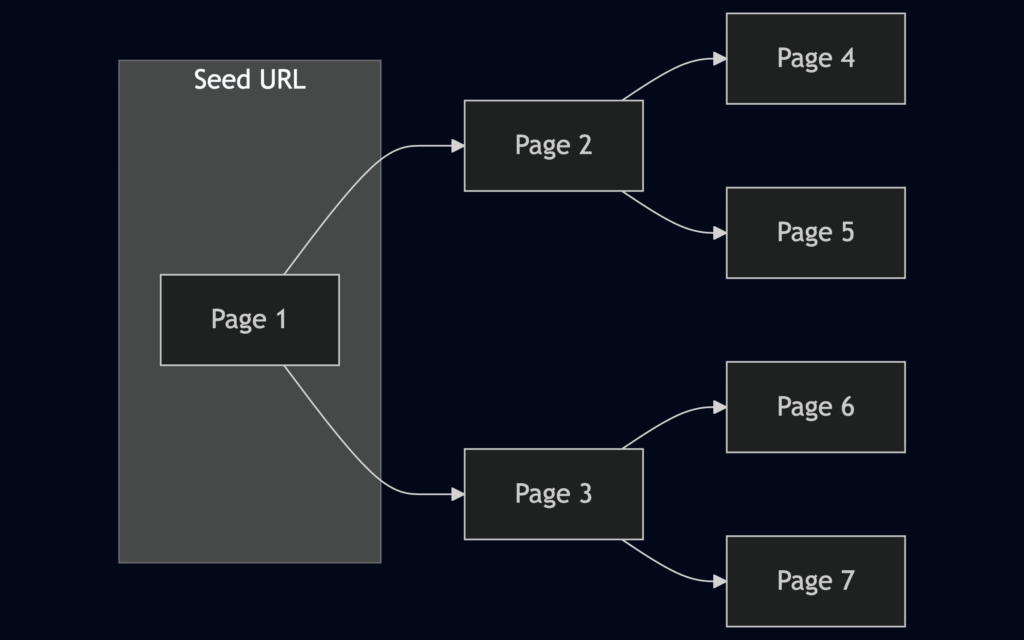
Depth-first crawlingprioritizes depth over breadth. It follows a single path of links as far as possible before backtracking and exploring other paths. This can be useful for finding specific content or reaching deep into a website’s structure.

Crawlers can extract a diverse array of data, each serving a specific purpose in the reconnaissance process:
Links (Internal and External): These are the fundamental building blocks of the web, connecting pages within a website (internal links) and to other websites (external links). Crawlers meticulously collect these links, allowing you to map out a website’s structure, discover hidden pages, and identify relationships with external resources.Comments: Comments sections on blogs, forums, or other interactive pages can be a goldmine of information. Users often inadvertently reveal sensitive details, internal processes, or hints of vulnerabilities in their comments.Metadata: Metadata refers todata about data. In the context of web pages, it includes information like page titles, descriptions, keywords, author names, and dates. This metadata can provide valuable context about a page’s content, purpose, and relevance to your reconnaissance goals.Sensitive Files: Web crawlers can be configured to actively search for sensitive files that might be inadvertently exposed on a website. This includesbackup files(e.g.,.bak,.old),configuration files(e.g.,web.config,settings.php),log files(e.g.,error_log,access_log), and other files containing passwords,API keys, or other confidential information. Carefully examining the extracted files, especially backup and configuration files, can reveal a trove of sensitive information, such asdatabase credentials,encryption keys, or even source code snippets.
Robots.txt:
Take robots.txt as an example. Imagine you’re invited to a party at a luxurious mansion. You’re free to walk around many areas, such as the gardens, the main hall, the living room,… Nevertheless, some rooms are marked as private, and the owner would prefer that guests do not enter them. The robots.txt file works in a similar way. It provides instructions to web crawlers and search engines about which areas of a website they are allowed to access and which areas the site owner would prefer them not to crawl.
Technically, robots.txt is a simple text file placed in the root directory of a website (e.g., www.example.com/robots.txt). It adheres to the Robots Exclusion Standard, guidelines for how web crawlers should behave when visiting a website. This file contains instructions in the form of “directives” that tell bots which parts of the website they can and cannot crawl.
The directives in robots.txt typically target specific user-agents, which are identifiers for different types of bots. For example, a directive might look like this:
User-agent: *
Disallow: /critical/
This directive tells all user-agents (* is a wildcard) that they are not allowed to access any URLs that start with /critical/. Other directives can allow access to specific directories or files, set crawl delays to avoid overloading a server or provide links to sitemaps for efficient crawling.
robots.txt Structure:
The robots.txt file is a plain text document that lives in the root directory of a website. It follows a straightforward structure, with each set of instructions, or “record,” separated by a blank line. Each record consists of two main components:
User-agent: This line specifies which crawler or bot the following rules apply to. A wildcard (*) indicates that the rules apply to all bots. Specific user agents can also be targeted, such as “Googlebot” (Google’s crawler) or “Bingbot” (Microsoft’s crawler).Directives: These lines provide specific instructions to the identified user-agent.
Common directives include:
- Disallow: Specifies paths or patterns that the bot should not crawl. For example,
Disallow: /admin/(disallow access to the admin directory) - Allow: Explicitly permits the bot to crawl specific paths or patterns, even if they fall under a broader
Disallowrule. For instance,Allow: /public/(allow access to the public directory). - Crawl-delay: Sets a delay (in seconds) between successive requests from the bot to avoid overloading the server. For example,
Crawl-delay: 10(10-second delay between requests). - Sitemap: Provides the URL to an XML sitemap for more efficient crawling.
While robots.txt is not strictly enforceable (a rogue bot could still ignore it), most legitimate web crawlers and search engine bots will respect its directives. This is important for several reasons:
Avoiding Overburdening Servers: By limiting crawler access to certain areas, website owners can prevent excessive traffic that could slow down or even crash their servers.Protecting Sensitive Information: Robots.txt can shield private or confidential information from being indexed by search engines.Legal and Ethical Compliance: In some cases, ignoring robots.txt directives could be considered a violation of a website’s terms of service or even a legal issue, especially if it involves accessing copyrighted or private data.
robots.txt serves as a valuable source of intelligence. While respecting the directives outlined in this file, security professionals can glean crucial insights into the structure and potential vulnerabilities of a target website:
Uncovering Hidden Directories: Disallowed paths in robots.txt often point to directories or files the website owner intentionally wants to keep out of reach from search engine crawlers. These hidden areas might house sensitive information, backup files, administrative panels, or other resources that could interest an attacker.Mapping Website Structure: By analyzing the allowed and disallowed paths, security professionals can create a rudimentary map of the website’s structure. This can reveal sections that are not linked from the main navigation, potentially leading to undiscovered pages or functionalities.Detecting Crawler Traps: Some websites intentionally include “honeypot” directories in robots.txt to lure malicious bots. Identifying such traps can provide insights into the target’s security awareness and defensive measures.
Well-Known URIs:
According to Wikipedia, “A well-known URI is a Uniform Resource Identifier for URL path prefixes that start with /.well-known/. They are implemented in webservers so that requests to the servers for well-known services or information are available at URLs consistent well-known locations across servers.”
The .well-known standard, defined in RFC 8615, serves as a standardized directory within a website’s root domain. This designated location, typically accessible via the /.well-known/ path on a web server, centralizes a website’s critical metadata, including configuration files and information related to its services, protocols, and security mechanisms.
The Internet Assigned Numbers Authority (IANA) maintains a registry of .well-known URIs, each serving a specific purpose defined by various specifications and standards.
In web recon, the .well-known URIs can be invaluable for discovering endpoints and configuration details that can be further tested during a penetration test. One particularly useful URI is openid-configuration.
The openid-configuration URI is part of the OpenID Connect Discovery protocol, an identity layer built on top of the OAuth 2.0 protocol. When a client application wants to use OpenID Connect for authentication, it can retrieve the OpenID Connect Provider’s configuration by accessing the https://example.com/.well-known/openid-configuration endpoint. This endpoint returns a JSON document containing metadata about the provider’s endpoints, supported authentication methods, token issuance, and more.
Web Crawler Tools:
Web crawling is vast and intricate, but you don’t have to embark on this journey alone. A plethora of web crawling tools are available to assist you, each with its own strengths and specialties. These tools automate the crawling process, making it faster and more efficient, allowing you to focus on analyzing the extracted data.
Some popular web crawling tools such as: Burp Suite Spider, OWASP ZAP, Scarpy, Apache Nutch,…
There are a few important considerations when performing web crawling or spidering. Regardless of which tool you choose, you should always obtain proper authorization before collecting data from a website, especially when the activity may involve accessing sensitive or private information.
Another important consideration is the target website’s resources and stability. Crawlers can generate a large number of requests in a short period of time, so care should be taken to avoid overwhelming the server or negatively impacting its availability. Proper rate limiting, scope restrictions, and responsible testing practices should always be followed to minimize disruption to the target environment.
Hands-on:
I’ll use the Hackthebox lab for the hands on section,
Before we begin, ensure you have Scrapy installed on your system. If you don’t, you can easily install it using pip, the Python package installer: pip3 install scrapy
First and foremost, download the custom scrapy spider, ReconSpider, and extract it to the current working directory: wget -O ReconSpider.zip https://academy.hackthebox.com/storage/modules/144/ReconSpider.v1.2.zip
With the files extracted, you can run ReconSpider.py using the following command: python3 ReconSpider.py <target_domain>
After running ReconSpider.py, the data will be saved in a JSON file, results.json. This file can be explored using any text editor. Below is the structure of the JSON file produced, Each key in the JSON file represents a different type of data extracted from the target website:

We can gain valuable insights into the web application’s architecture, content, and potential points of interest for further investigation.
Web Archives
In the fast-paced digital world, websites come and go, leaving only fleeting traces of their existence behind. However, thanks to the Internet Archive’s Wayback Machine, we have a unique opportunity to revisit the past and explore the digital footprints of websites as they once were.
The Wayback Machine is a digital archive of the World Wide Web and other information on the Internet. Founded by the Internet Archive, a non-profit organization, it has been archiving websites since 1996.
The Wayback Machine operates by using web crawlers to capture snapshots of websites at regular intervals automatically. These crawlers navigate through the web, following links and indexing pages, much like how search engine crawlers work. However, instead of simply indexing the information for search purposes, the Wayback Machine stores the entire content of the pages, including HTML, CSS, JavaScript, images, and other resources.

Crawling: The Wayback Machine employs automated web crawlers, often called “bots,” to browse the internet systematically. These bots follow links from one webpage to another, like how you would click hyperlinks to explore a website. However, instead of just reading the content, these bots download copies of the webpages they encounter.Archiving: The downloaded webpages, along with their associated resources like images, stylesheets, and scripts, are stored in the Wayback Machine’s vast archive. Each captured webpage is linked to a specific date and time, creating a historical snapshot of the website at that moment. This archiving process happens at regular intervals, sometimes daily, weekly, or monthly, depending on the website’s popularity and frequency of updates.Accessing: Users can access these archived snapshots through the Wayback Machine’s interface. By entering a website’s URL and selecting a date, you can view how the website looked at that specific point. The Wayback Machine allows you to browse individual pages and provides tools to search for specific terms within the archived content or download entire archived websites for offline analysis.
The frequency with which the Wayback Machine archives a website varies. Some websites might be archived multiple times a day, while others might only have a few snapshots spread out over several years. Factors that influence this frequency include the website’s popularity, its rate of change, and the resources available to the Internet Archive.
It’s important to note that the Wayback Machine does not capture every single webpage online. It prioritizes websites deemed to be of cultural, historical, or research value. Additionally, website owners can request that their content be excluded from the Wayback Machine, although this is not always guaranteed.
The Wayback Machine is a treasure trove for web reconnaissance, offering information that can be instrumental in various scenarios. Its significance lies in its ability to unveil a website’s past, providing valuable insights that may not be readily apparent in its current state:
Uncovering Hidden Assets and Vulnerabilities: The Wayback Machine allows you to discover old web pages, directories, files, or subdomains that might not be accessible on the current website, potentially exposing sensitive information or security flaws.Tracking Changes and Identifying Patterns: By comparing historical snapshots, you can observe how the website has evolved, revealing changes in structure, content, technologies, and potential vulnerabilities.Gathering Intelligence: Archived content can be a valuable source of OSINT, providing insights into the target’s past activities, marketing strategies, employees, and technology choices.Stealthy Reconnaissance: Accessing archived snapshots is a passive activity that doesn’t directly interact with the target’s infrastructure, making it a less detectable way to gather information.
As mentioned earlier, not every website is archived by the Wayback Machine. Because of this, the target you are investigating may not appear in the archive at all, or it may have only limited historical snapshots available. That said, the Wayback Machine can still be a valuable source of information when historical data is available. It may help reveal older versions of a website, deprecated pages, previous technologies, exposed content that has since been removed, or changes in the site’s structure over time. As for me, I mostly use it to take a trip down memory lane and revisit the internet of the past :V

Search Engine Discovery
Search engines serve as our guides in the vast landscape of the internet, helping us navigate through the seemingly endless expanse of information. However, beyond their primary function of answering everyday queries, search engines also hold a treasure trove of data that can be invaluable for web reconnaissance and information gathering. This practice, known as search engine discovery or OSINT (Open Source Intelligence) gathering, involves using search engines as powerful tools to uncover information about target websites, organisations, and individuals.
At its core, search engine discovery leverages the immense power of search algorithms to extract data that may not be readily visible on websites. Security professionals and researchers can delve deep into the indexed web by employing specialised search operators, techniques, and tools, uncovering everything from employee information and sensitive documents to hidden login pages and exposed credentials.
To be honest, this is a technique I use quite frequently during passive enumeration, and I’ve found it to be very effective. Back when I was doing threat hunting, I discovered many forgotten websites that were still publicly accessible on the internet. These were typically development, testing, staging, or demo environments that remained online after a project had been completed. In many cases, these systems were never properly decommissioned and continued to be indexed by search engines. With a few advanced Google searches, I was often able to identify these types of assets and include them in the organization’s attack surface inventory. What makes these environments particularly risky is that they are often maintained with less security oversight than production systems. It is not uncommon to find weak authentication controls, outdated software, default configurations, or overly simple credentials.
In fact, I’ve even encountered this situation within my own organization. During an internal review, I found several development and demo systems that were still exposed. After investigating further, I discovered that some of them were protected by extremely weak passwords (of course 123456789). I reported the findings to management and recommended either decommissioning the systems or strengthening the authentication controls to reduce the associated risk.
Search Operators:
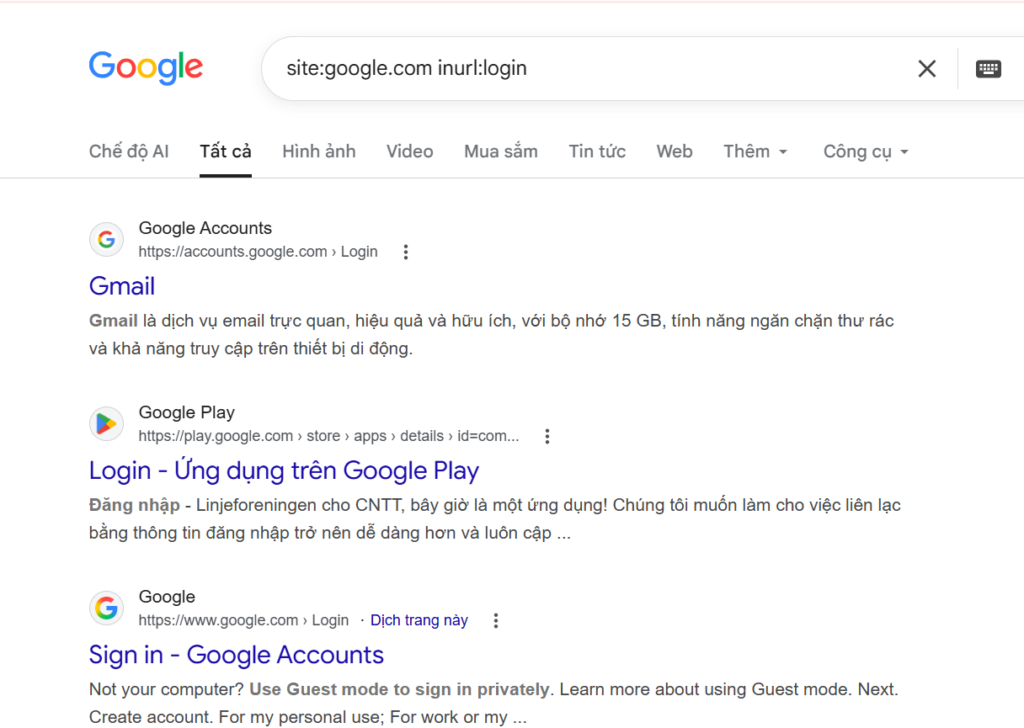
Search operators are like search engines’ secret codes. These special commands and modifiers unlock a new level of precision and control, allowing you to pinpoint specific types of information amidst the vastness of the indexed web. Google Dorking, also known as Google Hacking, is a technique that leverages the power of search operators to uncover sensitive information, security vulnerabilities, or hidden content on websites, using Google Search, for more examples, refer to the Google Hacking Database
For example, finding Login Pages releated to Google.com:
Automating Recon
While manual reconnaissance can be effective, it can also be time-consuming and prone to human error. Automating web reconnaissance tasks can significantly enhance efficiency and accuracy, allowing you to gather information at scale and identify potential vulnerabilities more rapidly.
Automation offers several key advantages for web reconnaissance:
Efficiency: Automated tools can perform repetitive tasks much faster than humans, freeing up valuable time for analysis and decision-making.Scalability: Automation allows you to scale your reconnaissance efforts across a large number of targets or domains, uncovering a broader scope of information.Consistency: Automated tools follow predefined rules and procedures, ensuring consistent and reproducible results and minimising the risk of human error.Comprehensive Coverage: Automation can be programmed to perform a wide range of reconnaissance tasks, including DNS enumeration, subdomain discovery, web crawling, port scanning, and more, ensuring thorough coverage of potential attack vectors.Integration: Many automation frameworks allow for easy integration with other tools and platforms, creating a seamless workflow from reconnaissance to vulnerability assessment and exploitation.
These frameworks aim to provide a complete suite of tools for web reconnaissance:
- FinalRecon: A Python-based reconnaissance tool offering a range of modules for different tasks like SSL certificate checking, Whois information gathering, header analysis, and crawling. Its modular structure enables easy customisation for specific needs.
- Recon-ng: A powerful framework written in Python that offers a modular structure with various modules for different reconnaissance tasks. It can perform DNS enumeration, subdomain discovery, port scanning, web crawling, and even exploit known vulnerabilities.
- theHarvester: Specifically designed for gathering email addresses, subdomains, hosts, employee names, open ports, and banners from different public sources like search engines, PGP key servers, and the SHODAN database. It is a command-line tool written in Python.
- SpiderFoot: An open-source intelligence automation tool that integrates with various data sources to collect information about a target, including IP addresses, domain names, email addresses, and social media profiles. It can perform DNS lookups, web crawling, port scanning, and more.
- OSINT Framework: A collection of various tools and resources for open-source intelligence gathering. It covers a wide range of information sources, including social media, search engines, public records, and more.
Hands on:
For the hands-on section, I’ll be using FinalRecon. Before we begin, let me briefly go over some of the features that FinalRecon provides:
Header Information: Reveals server details, technologies used, and potential security misconfigurations.Whois Lookup: Uncovers domain registration details, including registrant information and contact details.SSL Certificate Information: Examines the SSL/TLS certificate for validity, issuer, and other relevant details.Crawler:- HTML, CSS, JavaScript: Extracts links, resources, and potential vulnerabilities from these files.
- Internal/External Links: Maps out the website’s structure and identifies connections to other domains.
- Images, robots.txt, sitemap.xml: Gathers information about allowed/disallowed crawling paths and website structure.
- Links in JavaScript, Wayback Machine: Uncovers hidden links and historical website data.
DNS Enumeration: Queries over 40 DNS record types, including DMARC records for email security assessment.Subdomain Enumeration: Leverages multiple data sources (crt.sh, AnubisDB, ThreatMiner, CertSpotter, Facebook API, VirusTotal API, Shodan API, BeVigil API) to discover subdomains.Directory Enumeration: Supports custom wordlists and file extensions to uncover hidden directories and files.Wayback Machine: Retrieves URLs from the last five years to analyse website changes and potential vulnerabilities.
To use FinalRecon, we first need to install it. Start by cloning the source code repository, then install the required dependencies using pip3 install -r requirements.txt. Finally, grant execute permissions to the finalrecon.py file so that it can be run directly from the command line.
Running ./finalrecon.py --help, this will display a help message with details on how to use the tool, including the various modules and their respective options:

For instance, if I want FinalRecon to gather header information and perform a Whois lookup for google.com, I would use the corresponding flags (--headers and --whois), so the command would be:

Okay, I think it’s a good place to wrap up the Website Information Gathering topic. The article has already become quite lengthy.
In the future, I’ll continue updating my toolkit and notes with additional tools and techniques that can help with OSINT, reconnaissance, and web enumeration. The goal of these two articles was not to cover every possible technique, but rather to provide a practical reminder of the thought process and methodology we should follow when beginning an external web penetration test.
Hopefully, these two parts will serve as a useful checklist for both you and me whenever we start assessing a new target: understanding the attack surface, gathering information efficiently, and building a solid foundation before moving on to vulnerability discovery and exploitation.
Thanks for following along, and I’ll see you in the next topic!