Overview of Web Applications
Introduction
Web applications are interactive software programs that operate through web browsers. They commonly use a client-server architecture to process requests and manage user interactions. These applications generally consist of two main components: the front end, which includes the website interface and represents what users see and interact with in their browsers, and the back end, which contains the application’s source code and runs on servers, often interacting with databases to process and store information.
Web applications give organizations the ability to provide powerful software that can be accessed from anywhere in the world. They also offer a high level of control over the application’s design, features, and functionality, with changes and interactions taking place in real time. Common examples of web applications include email services such as Gmail, online shopping platforms such as Amazon, and web-based productivity tools such as Google Docs.
Web applications are not limited to large technology companies such as Google or Microsoft. With the right skills and resources, almost any web developer can build an application and host it using one of the many web hosting services available today. Once online, these applications can be accessed by people from anywhere in the world. As a result, the internet is now home to millions of web applications, with billions of users interacting with them every day.
Web Applications vs. Websites:
In the early days of the web, most websites were static, meaning their content could not change dynamically based on user interactions. These traditional websites were designed to display specific information, and any updates or changes had to be made manually by developers. Static web pages generally had limited functionality and could not provide the interactive, real-time experiences we are familiar with today. This early stage of the internet is commonly referred to as Web 1.0.
In contrast, modern websites often use web applications, commonly associated with Web 2.0, to deliver dynamic content that responds to user interactions. Unlike traditional static websites, web applications provide interactive features and can perform a wide range of tasks for users. This functionality allows users to actively interact with the application rather than simply viewing information on a page.
Web Applications vs. Native OS Applications:
Unlike native operating system (OS) applications, web applications are generally platform-independent, meaning they can be accessed through a web browser regardless of the operating system being used. They also do not usually require installation on the user’s device. Instead, much of the application’s processing and functionality is handled on remote servers, which reduces the amount of storage space required on the user’s computer.
Another key advantage of web applications over native OS applications is version consistency. Since users access the application through the same web-based system, they can generally use the latest version without having to manually install updates. Developers can update and modify the application directly on the web server, making new features and fixes available to users immediately. This centralized approach eliminates the need to create and maintain separate builds for different platforms, while also reducing maintenance, support, and update-related costs.
On the other hand, native OS applications also offer several advantages over web applications, particularly in terms of performance and access to local system resources. Because native applications are designed specifically for a particular operating system, they can take full advantage of its libraries, hardware, and built-in features. This often allows them to load and respond more quickly. Native applications can also provide deeper integration with the operating system, giving them access to capabilities that may be limited or unavailable to applications running within a web browser.
More recently, hybrid applications and Progressive Web Apps (PWAs) have become increasingly popular. These applications combine the flexibility of web technologies with some of the capabilities of native applications. By using modern frameworks and technologies, they can access certain native OS features and device resources, providing better performance and functionality than traditional web applications while remaining accessible through web-based platforms.
Web Application Structure:
Organizations develop web applications for different purposes, users, and business requirements, which means their designs and implementations can vary significantly. The back-end infrastructure can also be configured in many different ways depending on the application’s needs and the organization’s environment. To properly understand how web applications work, it is important to look beyond what users see in the browser. Understanding the application’s overall structure, its individual components, how they communicate with each other, and how they are deployed within an organization’s infrastructure can provide valuable insight into how the application operates behind the scenes.
Web applications are made up of multiple layers, which can generally be grouped into three main categories:
- Web Application Infrastructure: Refers to the underlying components and resources required for a web application to operate properly, such as web servers, databases, and other supporting services. Because a web application may run on a separate server from its database, it is important to understand how these components are connected and which database or services the application relies on.
- Web Application Components: Refers to the different elements that make up a web application and enable it to function and interact with users and other systems. These components can generally be grouped into three main areas: UI/UX, client-side components, and server-side components.
- Web Application Architecture: Describes how the different components of a web application are organized and how they communicate and interact with one another. It defines the relationships between the application’s components and how data and requests flow throughout the system.
Web Application Security Risks:
Web application attacks are a common security concern for organizations of all sizes. Because web applications are typically accessible from anywhere with an internet connection and a web browser, they can be exposed to a wide range of potential threats. Their complexity and broad functionality can also create a large attack surface, giving attackers more opportunities to identify and exploit weaknesses. In addition, automated tools can be used to scan web applications for vulnerabilities, potentially causing significant damage when used maliciously. As web applications continue to become more complex and feature-rich, the risk of security vulnerabilities being introduced during their development also increases.
A successful web application attack can result in serious financial losses, data breaches, and significant disruption to business operations. Web applications often run on servers that also host other services or sensitive information, and they may be connected to databases containing confidential user or organizational data. If an attacker gains access through a vulnerable web application, this information could also be exposed or compromised. For this reason, organizations that rely on web applications should regularly test them for security vulnerabilities and address identified issues as quickly as possible. After applying a security patch, it is also important to verify that the vulnerability has been properly fixed and that the update has not introduced new security issues.
Web applications can vary significantly in their design, architecture, and configuration, so there is no single approach that works for every application. One of the most widely recognized resources for assessing and testing web application security is the OWASP Web Security Testing Guide (WSTG). It provides a structured methodology and practical guidance for identifying and evaluating common security vulnerabilities in web applications.
A common approach to web application security testing is to begin by examining the application’s front-end components, including HTML, CSS, and JavaScript, often referred to as the “front-end trinity.” Testers analyze these components for potential vulnerabilities, such as sensitive data exposure and Cross-Site Scripting (XSS). After evaluating the front end, the assessment typically moves to the application’s core functionality and the communication between the browser and web server. This helps testers identify the technologies and services being used and determine whether they contain potential security weaknesses. Web applications are generally assessed from both unauthenticated and authenticated perspectives when login functionality is available. Testing both access levels helps provide broader coverage and identify vulnerabilities that may only be exposed under specific user privileges or application states.
Front-End Components
We often hear terms such as front-end development, back-end development, and full-stack development when discussing web applications. Full-stack development refers to working with both the front end and back end of an application. While these terms are closely related to web application development, they describe different parts of the development process. The front end focuses on what users see and interact with, while the back end handles the application’s logic, data processing, and communication with servers and databases.
The front end of a web application consists of the components that users interact with directly through their web browser. Also known as the client side, it includes the source code responsible for displaying and controlling the web page users see. The main technologies used in the front end are HTML, CSS, and JavaScript, which are processed and executed by the browser to create the application’s interface and interactive features.
The front end includes everything users see and interact with on a web page. HTML defines the main structure and content, such as headings, text, images, and other page elements. CSS controls the visual appearance, including layouts, colors, styles, and animations. JavaScript adds functionality and interactivity, determining how different parts of the page behave and respond to user actions.
Modern web applications are expected to adapt to different screen sizes, browsers, and devices, including smartphones and tablets. This differs from many back-end components, which may be designed for a specific platform or operating environment. The performance of the front end can have a significant impact on the overall user experience. If it is poorly optimized, a web application may become slow, laggy, or unresponsive. Users might assume that the problem is caused by the server or their internet connection, when the actual issue is running in the browser on the client side. Therefore, the front end should be properly optimized to provide a consistent and responsive experience across different browsers, devices, and screen sizes.
In addition to writing front-end code, web application development also involves several other important areas that contribute to the overall design and user experience. These include:
Visual Web Design – defining the overall look, layout, and visual style of the application.
User Interface (UI) Design – designing the elements users interact with, such as buttons, menus, forms, and navigation.
User Experience (UX) Design – focusing on how easy, efficient, and intuitive the application is for users.
Okay, now let’s go through the components of the front end.
HTML (HyperText Markup Language):
HTML is the foundation of web pages on the internet. It defines the basic structure and content of a page, including headings, text, forms, images, links, and other elements. When a user visits a web page, the browser interprets the HTML code and uses it to display the content and structure that the user sees.
The HTML elements can be viewed as follows:
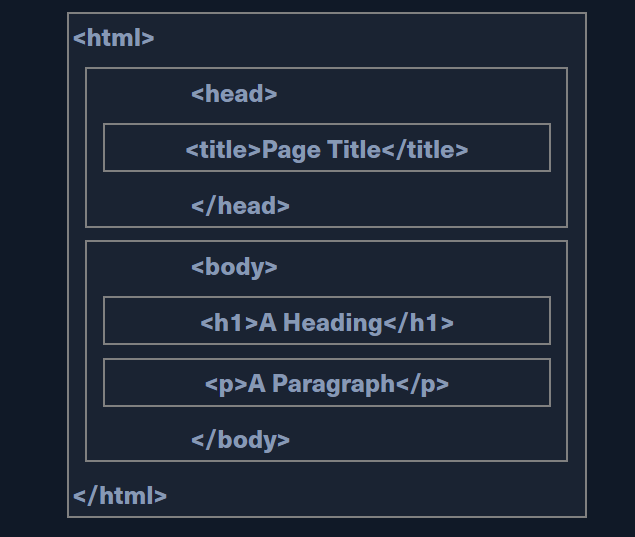
HTML elements are typically defined using opening and closing tags, which indicate the type of content they contain. For example, the <p> tag is used to define a paragraph, with the text placed between the opening and closing tags:
<p>This is a paragraph.</p>
HTML tags can also include attributes, such as id and class, which provide additional information about an element and can be used by CSS or JavaScript to identify and style it. For example:
<p id="para1">This is a paragraph.</p>
Together, the opening tag, content, and closing tag make up an HTML element.
An important concept to understand when working with HTML and web applications is URL encoding, also known as percent-encoding. It is used to ensure that URLs can safely represent characters that may not be valid or supported in their original form. URLs traditionally use characters from the ASCII character set, which includes letters, numbers, and a limited set of special characters. Characters outside this set, as well as certain reserved characters, must be encoded before they can be safely included in a URL. URL encoding represents these characters using a % symbol followed by two hexadecimal digits. This allows browsers and web servers to correctly interpret the data contained in a URL.
For example, the single-quote character (') is represented as %27 when URL-encoded. This allows browsers and web servers to correctly interpret the character when it appears in a URL. Similarly, spaces cannot be used directly in URLs. They are typically encoded as %20, while in some contexts, such as query parameters, a space may also be represented by a + (plus sign). A full character encoding table can be seen here.
DOM (Document Object Model):
The <head> element contains information and resources that are generally not displayed directly on the web page, such as the page title, metadata, and links to external resources. The main content that users see and interact with is placed inside the <body> element. Other important HTML elements include <style>, which can contain the page’s CSS rules for controlling its appearance, and <script>, which is used to include or execute JavaScript code that adds functionality and interactivity to the page.
These HTML elements are represented within the DOM (Document Object Model), which provides a structured representation of a web page and its content. The browser creates the DOM when it parses the HTML, allowing scripts such as JavaScript to access and modify the page’s elements dynamically.
The World Wide Web Consortium (W3C) defines the DOM as: “The W3C Document Object Model (DOM) is a platform and language-neutral interface that allows programs and scripts to dynamically access and update the content, structure, and style of a document.”
The DOM standard can be divided into three main parts:
Core DOM – Defines the standard model and structure that applies to all document types.
XML DOM – Provides the standard model for working with XML documents.
HTML DOM – Defines the standard model for HTML documents and web pages.
Cascading Style Sheets (CSS):
CSS is a stylesheet language used alongside HTML to control the appearance and presentation of web pages. While HTML defines the structure and content of a page, CSS determines how those elements look, including their colors, fonts, spacing, layouts, and other visual properties. CSS has evolved through different versions and specifications, with newer features being introduced over time. Modern web browsers are continually updated to support these features, allowing developers to create more visually appealing and responsive web pages.
CSS can be used for advanced animations for a wide variety of uses, from moving items all the way to advanced 3D animations. Many CSS properties are available for animations, like @keyframes, animation, animation-duration, animation-direction, and many others. You can read about and try out many of these animation properties here.
CSS is often used together with JavaScript to create dynamic and interactive web experiences. JavaScript can calculate values, respond to user actions, and modify the CSS properties of HTML elements in real time. This makes it possible to create effects that respond to events such as keyboard input, mouse movements, clicks, and other user interactions. The following example beautifully illustrates such capabilities of CSS when used with HTML and JavaScript “Parallax Depth Cards – by Andy Merskin on CodePen“.
CSS is not limited to styling HTML pages. It can also be used with other technologies, such as XML and SVG, to control the appearance of their elements. In addition, CSS-based styling concepts are widely used in modern application development, including some mobile development frameworks, where they can help define the layout and appearance of user interfaces (UI).
CSS can sometimes be challenging to work with, especially when developers need to manually style and maintain a large number of HTML elements across multiple pages. To simplify this process, many CSS frameworks have been developed. These frameworks provide collections of pre-built styles, components, and layouts that allow developers to create attractive and responsive web pages more quickly and consistently.
Many CSS frameworks are specifically designed to support modern web development and work well alongside JavaScript and other front-end technologies. They provide reusable styles, components, and layouts for common interface elements, helping developers build web applications more efficiently and consistently.
Some widely used CSS frameworks and tools include:
JavaScript:
JavaScript is one of the most used languages in the world. It is commonly used to build interactive and dynamic features on the front end of web applications, where it runs directly in the user’s browser. However, JavaScript is not limited to front-end development. With technologies such as Node.js, JavaScript can also be used on the server side to build back-end services and even complete web applications. This makes JavaScript a versatile language that can be used across different parts of the web development stack.
While HTML defines the structure of a web page and CSS controls its appearance, JavaScript is primarily responsible for adding functionality and interactivity. It allows web pages to respond to user actions, update content dynamically, validate input, and perform various tasks without requiring the entire page to reload. Without JavaScript, many web pages would be largely static, with limited interaction and functionality beyond displaying information and navigating between pages. There are many sites available online to experiment with JavaScript. One example is JSFiddle which can be used to test JavaScript, CSS, and HTML and save code snippets. JavaScript is an advanced language, and its syntax is not as simple as HTML or CSS.
Most common web applications heavily rely on JavaScript to drive all needed functionality on the web page, like updating the web page view in real-time, dynamically updating content in real-time, accepting and processing user input, and many other potential functionalities. JavaScript can also automate complex tasks and communicate with back-end services by sending and receiving data over HTTP. Technologies such as AJAX (Asynchronous JavaScript and XML) allow web pages to exchange data with a server in the background without requiring the entire page to reload.
In addition to automation, JavaScript is often used alongside CSS to create advanced animations and interactive effects that cannot be achieved with CSS alone. Whenever we visit an interactive and dynamic web page with complex, visually appealing animations, we are seeing the result of JavaScript code actively running in the browser. All modern web browsers include JavaScript engines capable of executing JavaScript code on the client side, without requiring the back-end web server to update the page for every interaction. This allows JavaScript to perform many operations quickly and efficiently, making it an essential technology for building responsive, interactive, and dynamic web applications.
As web applications become increasingly complex and advanced, developing an entire application using pure JavaScript from scratch can become inefficient and time-consuming. To address these challenges, a wide range of JavaScript frameworks and libraries have been introduced. These tools simplify the development process by providing reusable components, built-in functionality, and established structures for creating modern web applications more efficiently.
These platforms provide libraries and tools that make it much easier to implement advanced functionality, such as user authentication, login, and registration. They also introduce new approaches built on existing web technologies, such as dynamically updating HTML content rather than relying solely on static HTML pages. These platforms either use JavaScript as their programming language or use an implementation of JavaScript that compiles its code into JavaScript code.
Some of the most common front end JavaScript frameworks are:
Common Front-End Vulnerabilities
All of the front-end components discussed above execute on the client side. Therefore, vulnerabilities in these components generally do not pose a direct threat to the core back end of a web application and, by themselves, typically do not result in permanent damage to the server. However, because front-end code runs in the user’s browser, vulnerabilities can still put end users at risk of attacks and exploitation. If an attacker successfully leverages a front-end vulnerability to target privileged users, such as administrators, the impact can extend beyond the individual user. Depending on the vulnerability and the application’s architecture, this could potentially lead to unauthorized access, exposure of sensitive information, service disruption, or further compromise of the application.
Sensitive Data Exposure:
Sensitive Data Exposure refers to situations where sensitive information is made available to users in plain text when it should not be. In web applications, this information may sometimes be found in the page source or client-side source code. The page source refers to the HTML and other client-side resources delivered to the user’s browser. This should not be confused with back-end source code, which runs on the server and is generally not directly accessible to users. Sensitive information exposed through client-side code can potentially be viewed by anyone with access to the web application and may therefore present a security risk. Sometimes a developer may disable right-clicking on a web application, but this does not prevent us from viewing the page source as we can merely type ctrl + u or view the page source through a web proxy such as Burp Suite.
Although it is no longer as common due to the increased awareness of information security nowadays, sometimes we may find login credentials, hashes, or other sensitive data hidden in the comments of a web page’s source code or within external JavaScript code being imported.
Other types of sensitive information may include exposed links, directories, configuration details, or user information. If discovered, this information can potentially provide attackers with additional insight into the web application and its underlying infrastructure. Depending on what is exposed and how the application is configured, such information may assist in identifying additional attack surfaces or gaining further unauthorized access to components such as the web server, database server, or other supporting systems. And with the rapid development of AI nowadays, non-technical people often feel confident that they can replace experienced developers. They are willing to rely on vibe coding to build web apps full of vulnerabilities. I even came across a case where a non-technical person used vibe coding and accidentally exposed the database connection details in the HTML source code.
For these reasons, one of the first things we should do when assessing a web application is to review its page source code to see if we can identify any ‘low-hanging fruit’, such as exposed credentials or hidden links.
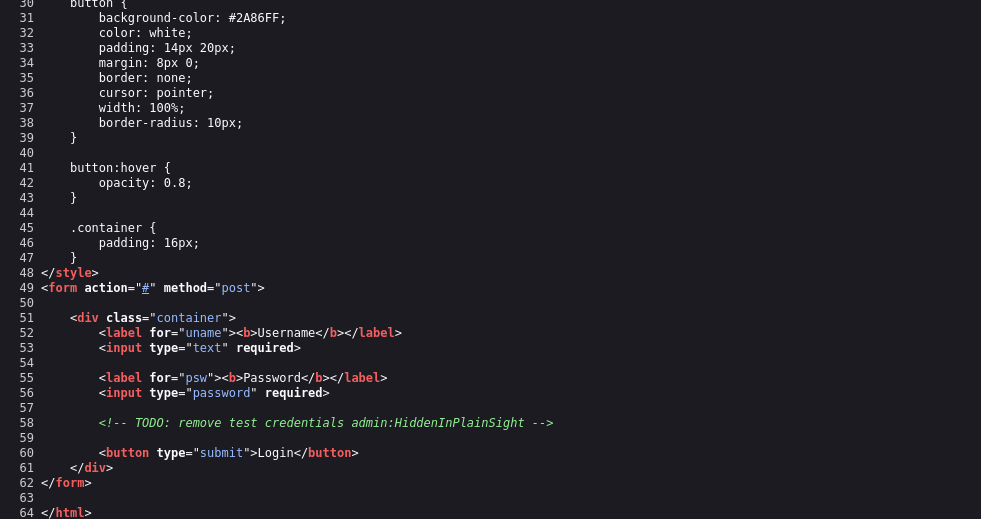
Ideally, front-end source code should contain only the code necessary for the web application to function properly. Unnecessary comments, debugging information, configuration details, or other sensitive data should not be included, as this information may be visible to end users. It is therefore important to review all client-side code that is delivered to users through the page source, JavaScript files, and other front-end resources. Developers and security teams can also use appropriate tools to scan these resources for accidentally exposed credentials, sensitive information, internal paths, or other details that could increase the application’s attack surface.
It is also important to classify the types of data contained within source code and establish appropriate controls over what can and cannot be exposed on the client side. Developers should carefully review client-side code to ensure that unnecessary comments, debugging information, hidden links, or other sensitive details are not inadvertently included. Front-end developers may also use JavaScript minification or obfuscation to make the code more difficult to read and analyze. However, these techniques should not be considered security controls for protecting sensitive information. Since client-side code is delivered to and executed by the user’s browser, determined users can generally inspect, extract, or reverse-engineer it. Sensitive credentials, secrets, and other confidential data should therefore never be placed in client-side code, regardless of whether the code has been packed, minified, or obfuscated.
HTML Injection:
Another important aspect of front-end security is validating and sanitizing user input. In many web applications, input validation and sanitization are primarily performed on the back end. However, some user input may be processed entirely on the client side without ever being sent to the server. HTML injection occurs when untrusted or insufficiently filtered user input is inserted into a web page and interpreted as HTML by the browser. This can happen when previously submitted content, such as a user comment retrieved from a back-end database, is rendered without proper output encoding. It can also occur when JavaScript directly inserts untrusted user input into the page on the client side.
When users have significant control over how their input is displayed, they may be able to submit HTML that the browser interprets as part of the web page. If this input is not properly validated, sanitized, or encoded, an attacker could inject malicious HTML content into the page. For example, an attacker could inject a fraudulent login form that visually resembles a legitimate authentication form. Unsuspecting users might enter their credentials into this form, potentially causing the credentials to be transmitted to an attacker-controlled server. This could allow the attacker to use the stolen credentials in subsequent attacks. Another example of HTML Injection is web page defacing. This consists of injecting new HTML code to change the web page’s appearance, inserting malicious ads, or even completely changing the page. This type of attack can result in severe reputational damage to the company hosting the web application.
The following example is a very basic web page with a single button “Click to enter your name.” When we click on the button, it prompts us to input our name and then displays our name as “Your name is ...“:

If no input sanitization is in place, this is potentially an easy target for HTML Injection and Cross-Site Scripting (XSS) attacks. By inspecting the page source code, we can see that no input sanitization is being applied. The application accepts user-supplied input and directly inserts it into the page without properly validating, encoding, or sanitizing the data.
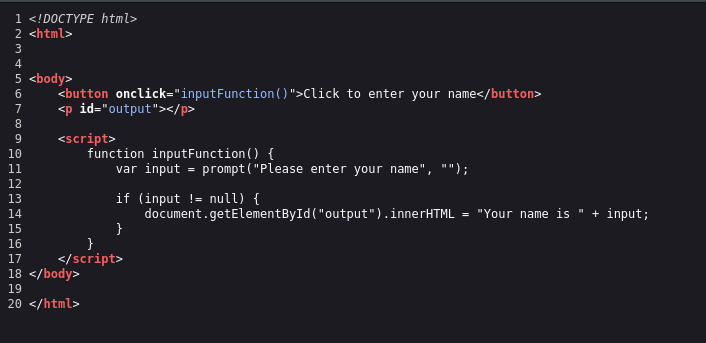
To test for HTML injection, we can submit a small HTML snippet as our name and observe whether the browser interprets it as part of the page. If the injected HTML is rendered rather than displayed as plain text, this indicates that the application may not be properly handling user-supplied input. For example, we can use a simple HTML element that changes the appearance of the web page, such as its background image: <style> body { background-image: url('<URL>'); } </style>


In this example, because the injected content is processed entirely on the client side and is not stored on the server, refreshing the web page resets the page to its original state. The injected changes therefore do not persist after the page is reloaded.
Cross-Site Scripting (XSS):
HTML injection vulnerabilities can sometimes be escalated into Cross-Site Scripting (XSS) vulnerabilities when an application allows attacker-controlled JavaScript to be executed in a victim’s browser. Successful XSS attacks can allow an attacker to perform actions within the victim’s browser context, potentially access sensitive information, or carry out unauthorized actions on behalf of the victim, depending on the application’s security controls.
XSS is closely related to HTML injection because both involve injecting attacker-controlled content into a web page. However, the key distinction is that XSS specifically involves the execution of JavaScript or other executable client-side code, enabling more advanced attacks against users of the vulnerable application rather than simply modifying the page’s HTML.
There are three main types of XSS:
- Reflected XSS: Occurs when user input is displayed on the page after processing (e.g., search result or error message).
- Stored XSS: Occurs when user input is stored in the back end database and then displayed upon retrieval (e.g., posts or comments).
- DOM XSS: Occurs when user input is directly shown in the browser and is written to an
HTMLDOM object (e.g., vulnerable username or page title).
In the HTML injection example above, no input sanitization or output encoding was applied. As a result, the same page may also be vulnerable to Cross-Site Scripting (XSS), depending on how user input is processed by the browser. We can try to inject the following DOM XSS JavaScript code as a payload, which should show us the cookie value for the current user:
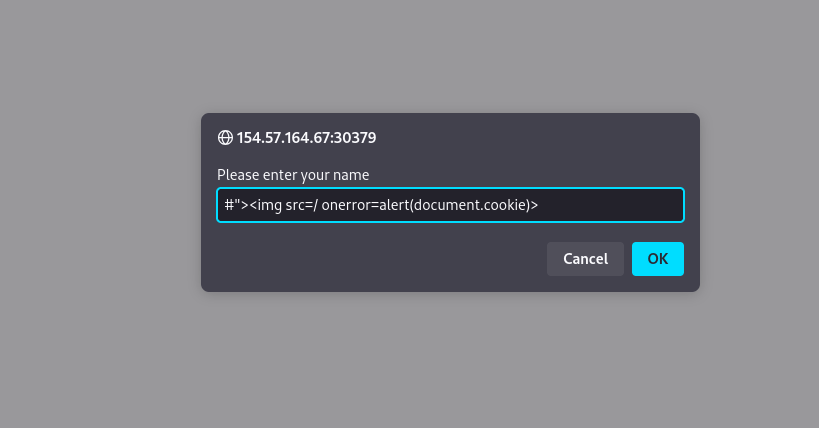
Once we input our payload and hit ok, we see that an alert window pops up with the cookie value in it:
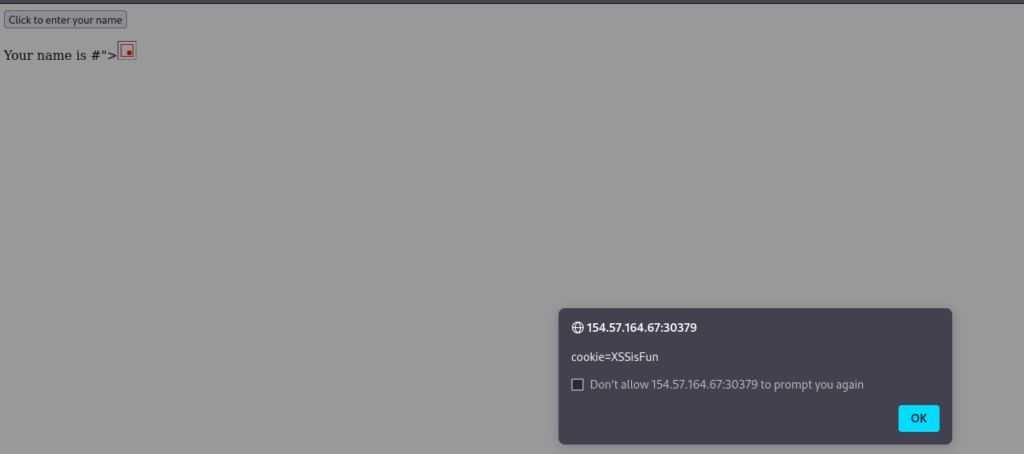
This payload is accessing the HTML document tree and retrieving the cookie object’s value. When the browser processes our input, it will be considered a new DOM, and our JavaScript will be executed, displaying the cookie value back to us in a popup.
An attacker can leverage this to steal cookie sessions and send them to themselves and attempt to use the cookie value to authenticate to the victim’s account. The same attack can be used to perform various types of other attacks against a web application’s users. XSS is a vast topic that will be covered in-depth in later modules.
Besides the three issues mentioned above, there are also some other problems on the front end, for example: Cross-Site Request Forgery (CSRF), Clickjacking, Cross-Origin Resource Sharing (CORS) Misconfiguration, Open Redirect and so on. I won’t go too deep into these issues in today’s post because this one is just an overview. Including too much information would make it overwhelming, so stay tuned for more details in the Offensive section.
Back-End Components
The back end is responsible for powering the core functionality of a web application. Everything needed for the application to work properly is processed and executed on the back-end server. Although it is not something users typically see or interact with directly, the back end plays a crucial role in making a website dynamic and functional rather than just a collection of static web pages. There are four main back end components for web applications.
Back End Servers:
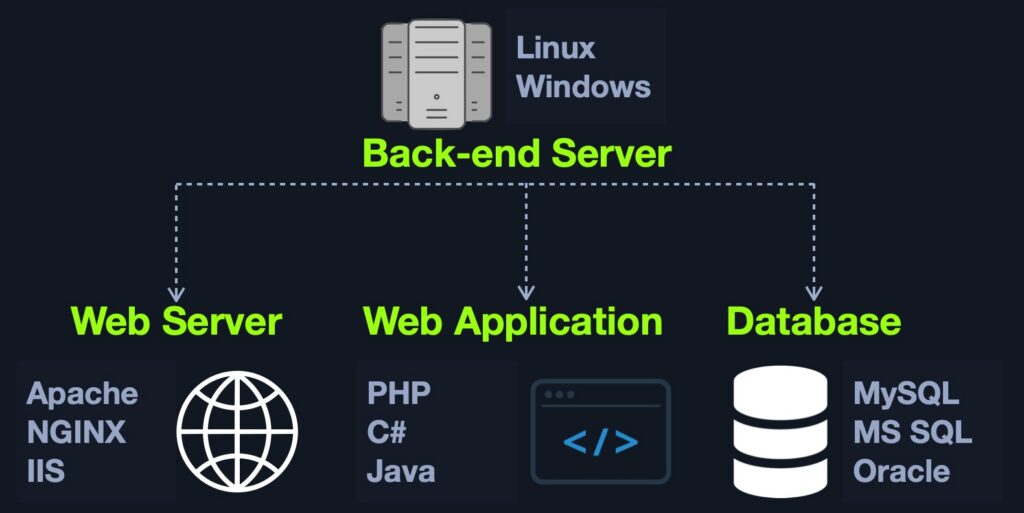
A back-end server is the hardware and operating system on the back end that hosts all of the applications necessary to run the web application. It is the real system running all of the processes and carrying out all of the tasks that make up the entire web application. The back end server would fit in the Data access layer.
The back-end server consists of three main components:
Web ServerDatabaseDevelopment Framework
The back-end server provides the hardware resources required to run a web application. Its processing power, memory, and overall performance directly affect how stable, fast, and responsive the application is. Large-scale web applications often use multiple back-end servers to distribute the workload. These servers work together to process requests and deliver the application to end users. A web application does not necessarily need to run on a single physical back-end server. Instead, it can be hosted through data centers or cloud platforms that provide virtual servers and the infrastructure needed to run the application.
Web Servers:
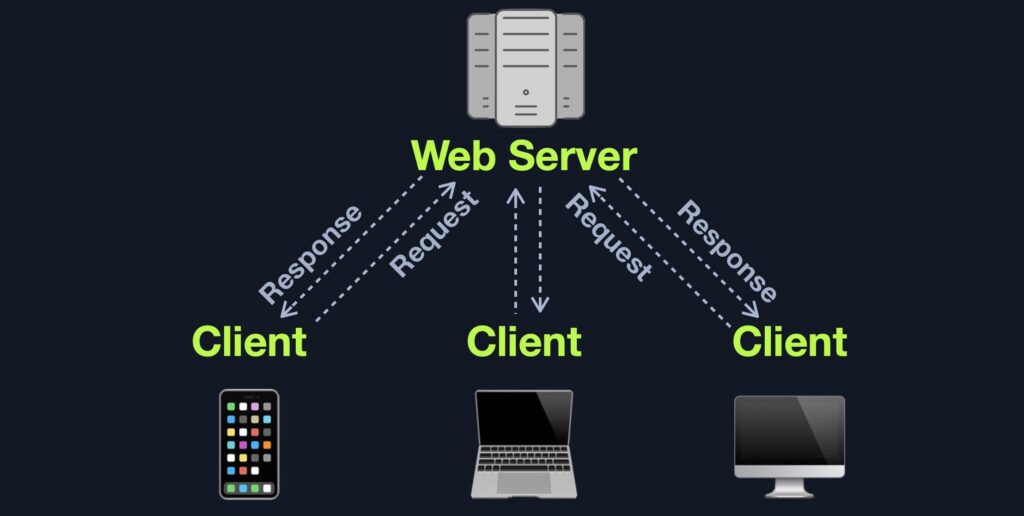
A web server is a software application running on the back-end server that manages HTTP requests from the client’s browser. It receives incoming requests, determines the appropriate resources or pages, forwards the requests when necessary, and sends the corresponding responses back to the browser. Web servers typically listen on TCP ports 80 for HTTP and 443 for HTTPS. They act as a bridge between end users and different components of the web application, handling incoming requests and delivering the appropriate responses.
A typical web server receives HTTP requests from the client and returns an appropriate HTTP response based on the outcome of the request. For example, it may return 200 OK when a request is successful, 404 Not Found when the requested page or resource does not exist, or 403 Forbidden when the client attempts to access a restricted resource. There are also many other HTTP status codes used to indicate different results, you can read it here.
Web servers can handle various types of input sent through HTTP requests, such as plain text, JSON data, and binary data, including files uploaded by users. When a web server receives a request, it processes and routes it to the appropriate destination, performs any necessary operations, and sends the resulting response back to the client. The pages, scripts, and other files that the web server accesses and serves are typically referred to as the core files of the web application.
There are many types of web servers that can be used to host and run web applications. Most of them are capable of handling complex HTTP requests and are available free of charge. It is also possible to build a basic web server from scratch using programming languages such as Python, JavaScript, or PHP. However, each language has popular web server solutions that are specifically designed and optimized to handle high volumes of web traffic. Using these existing solutions can save developers significant time and effort compared to building a web server themselves.
Apache or httpd is the most common web server on the internet, hosting more than 40% of all internet websites. Apache usually comes pre-installed in most Linux distributions and can also be installed on Windows and macOS servers. Apache is commonly used with PHP to develop and host web applications, but it also supports a range of other programming languages, including .NET, Python, and Perl. Through the CGI interface, Apache can even execute scripts written in operating-system languages such as Bash.
NGINX is the second most common web server on the internet, hosting roughly 30% of all internet websites. NGINX focuses on serving many concurrent web requests with relatively low memory and CPU load by utilizing an async architecture to do so. This makes NGINX a very reliable web server for popular web applications and top businesses worldwide, which is why it is the most popular web server among high traffic websites, with around 60% of the top 100,000 websites using NGINX.
IIS (Internet Information Services) is the third most common web server on the internet, hosting around 15% of all internet web sites. IIS is developed and maintained by Microsoft and mainly runs on Microsoft Windows Servers. IIS is usually used to host web applications developed for the Microsoft .NET framework, but can also be used to host web applications developed in other languages like PHP, or host other types of services like FTP. Furthermore, IIS is very well optimized for Active Directory integration and includes features like Windows Auth for authenticating users using Active Directory, allowing them to automatically sign in to web applications. Although IIS is not the most widely used web server, it is still adopted by many large organizations. It is particularly common in environments that run Windows Server on the back end or rely heavily on Microsoft Active Directory for managing users, devices, and resources across the organization.
Databases:
Web applications depend on back-end databases to store and manage a wide range of information. This can include important application resources such as images and files, website content like posts and updates, and user information such as usernames and passwords. By using databases, web applications can quickly save and retrieve data, making it possible to deliver dynamic content tailored to each user.
Different types of databases are available, and each one is designed for specific needs and situations. When choosing a database, developers usually consider several important factors, including how quickly it can store and retrieve data, how much information it can handle, how well it can scale as the application grows, and the overall cost.
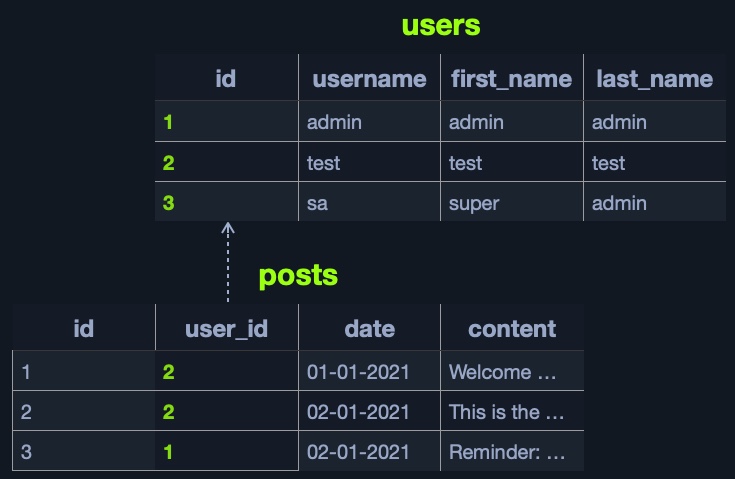
Relational, or SQL, databases organize information using tables made up of rows and columns. Each table can contain unique keys that connect it to other tables, allowing related data to be linked and organized efficiently.
For example, a relational database might have a users table with columns such as id, username, first_name, and last_name. The id column can serve as the unique key for each user. Another table, such as posts, could store content created by users, with columns like id, user_id, date, and content. The user_id can then be used to connect each post to the user who created it.
The id in the users table can be connected to the user_id in the posts table. This relationship makes it easy to retrieve the details of the user who created a particular post without needing to duplicate the user’s information in every post. A table can also contain multiple keys, allowing it to establish relationships with different tables. For instance, the id column in the posts table can be used to connect posts to a separate comments table. Each comment can then be associated with the specific post it belongs to, making it easier to organize and retrieve related data.
With relational databases, related information can be retrieved quickly and efficiently across multiple tables. For example, a single query can be used to gather information associated with a specific user from different tables. This makes relational databases a reliable and efficient choice for handling large datasets that follow a clear and well-defined structure. They also make it easier to organize, manage, and access data efficiently.
Some of the most common relational databases include:
- MySQL: The most commonly used database around the internet. It is an open-source database and can be used completely free of charge.
- MSSQL: Microsoft’s implementation of a relational database. Widely used with Windows Servers and IIS web servers.
- Oracle: A very reliable database for big businesses, and is frequently updated with innovative database solutions to make it faster and more reliable. It can be costly, even for big businesses.
- PostgreSQL: Another free and open-source relational database. It is designed to be easily extensible, enabling adding advanced new features without needing a major change to the initial database design.
- Other common SQL databases include:
SQLite,MariaDB,Amazon Aurora, andAzure SQL.
Unlike relational databases, non-relational databases do not organize data into traditional tables, rows, and columns, nor do they rely on primary keys, relationships, or fixed schemas. Instead, NoSQL databases use different data storage models depending on the type and structure of the information being stored. Because NoSQL databases do not require a fixed structure, they offer a high level of flexibility and scalability. This makes them particularly useful when working with data that does not follow a consistent or well-defined structure. In such cases, a NoSQL database can be a suitable option for storing and managing the data.
There are 4 common storage models for NoSQL databases:
- Key-Value
- Document-Based
- Wide-Column
- Graph
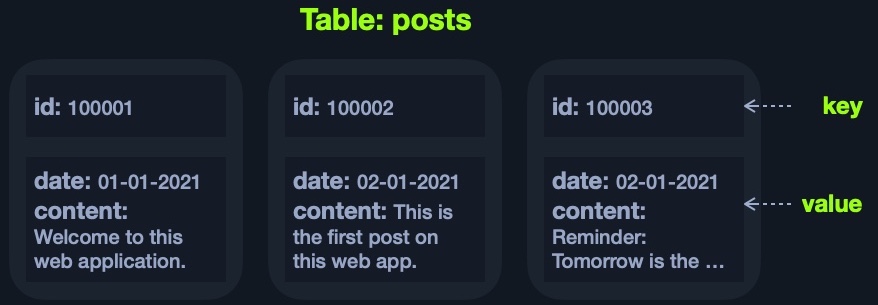
Each of the above models has a different way of storing data. For example, the Key-Value model usually stores data in JSON or XML, and has a key for each pair, storing all of its data as its value:
The above example can be represented using JSON as follows:
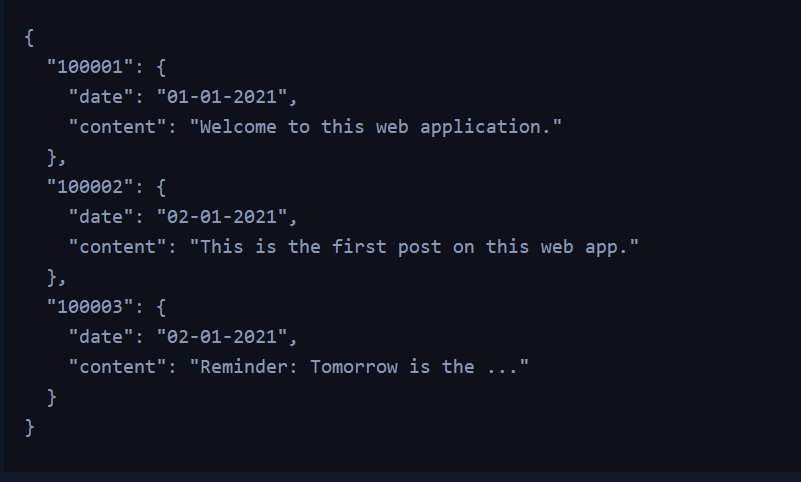
It looks similar to a dictionary/map/key-value pair in languages like Python or PHP ‘i.e. {'key':'value'}‘, where the key is usually a string, the value can be a string, dictionary, or any class object. The Document-Based model stores data in complex JSON objects and each object has certain meta-data while storing the rest of the data similarly to the Key-Value model.
Some of the most common NoSQL databases include:
- MongoDB: The most common
NoSQLdatabase. It is free and open-source, uses theDocument-Basedmodel, and stores data inJSONobjects. - ElasticSearch: Another free and open-source
NoSQLdatabase. It is optimized for storing and analyzing huge datasets. As its name suggests, searching for data within this database is very fast and efficient. - Apache Cassandra: Also free and open-source. It is very scalable and is optimized for gracefully handling faulty values.
- Other common
NoSQLdatabases include:Redis,Neo4j,CouchDB, andAmazon DynamoDB.
Development Frameworks & APIs:
Modern web applications are becoming increasingly complex, making it difficult to build sophisticated applications entirely from scratch. While web servers can host applications built with different programming languages, web development frameworks provide developers with the tools and structure needed to create the core components and functionality of these applications. By simplifying common development tasks and providing reusable features, frameworks have become an essential part of building many modern web applications.
Since many web applications rely on similar features, such as user registration and authentication, web development frameworks help developers implement these functions quickly and efficiently. They also make it easier to connect backend functionality with front-end components, allowing developers to build complete and fully functional web applications more efficiently. Some of the most widely used web development frameworks include:
- Laravel (
PHP): usually used by startups and smaller companies, as it is powerful yet easy to develop for. - Express (
Node.JS): used byPayPal,Yahoo,Uber,IBM, andMySpace. - Django (
Python): used byGoogle,YouTube,Instagram,Mozilla, andPinterest. - Rails (
Ruby): used byGitHub,Hulu,Twitch,Airbnb, and evenTwitterin the past.
It is important to note that modern websites often rely on a combination of different web servers and development frameworks, rather than using a single technology.
A key part of back-end web application development is using Web APIs and HTTP request parameters to establish communication between the front end and back end. These technologies allow data to be exchanged between the two components and enable the application to perform various functions and respond to user interactions effectively. The front end communicates with the back end through APIs to request specific operations and provide the necessary input. The back end then receives and processes these requests, performs the required actions, and sends an appropriate response back to the front end. The front-end component uses this response to generate and display the final output to the user on the client side.
An API, or Application Programming Interface, is a set of rules and mechanisms that defines how one application can communicate and interact with another. In web applications, APIs enable clients to remotely access and interact with functionality provided by the back-end components. However, APIs are not limited to web applications—they are widely used across different types of software to facilitate communication between systems and components. Web APIs are commonly accessed through the HTTP protocol, with web servers receiving, processing, and forwarding these requests between clients and back-end services.
For example, a weather application may provide an API that allows users to retrieve the current weather conditions for a specific city. By sending a request to the API endpoint with parameters such as a city name or city ID, the API can return the requested weather information, often in a JSON format. Another example is the Twitter API, which can be used to retrieve tweets from a specific account in formats such as JSON or XML. Depending on the user’s authentication and permissions, the API may also allow actions such as posting a new tweet.
To support API functionality within a web application, developers implement the required endpoints and logic on the back end using established API architectural styles and standards, such as REST or SOAP.
SOAP (Simple Object Access Protocol) is a web service protocol that uses XML to exchange data between applications. A SOAP request is typically sent as an XML message over HTTP, and the server returns the response in XML as well. The client-side components are responsible for parsing and processing the XML response so that the data can be used appropriately within the application. The following is an example of a SOAP message:
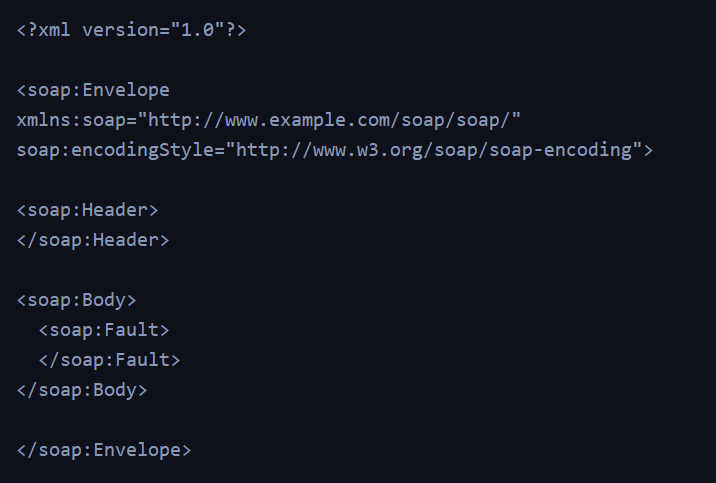
SOAP is very useful for transferring structured data (i.e., an entire class object), or even binary data, and is often used with serialized objects, all of which enables sharing complex data between front end and back end components and parsing it properly. It is also very useful for sharing stateful objects -i.e., sharing/changing the current state of a web page-, which is becoming more common with modern web applications and mobile applications.
However, SOAP can be relatively complex to work with, especially for beginners. Even simple operations, such as basic searches or filtering data, may require lengthy and complicated requests. This complexity can make SOAP less convenient for straightforward web application tasks. REST APIs provide a simpler and more flexible approach, making them a popular alternative for many modern web applications.
REST (Representational State Transfer) is an architectural style that enables applications to exchange data through HTTP requests. Instead of relying on complex XML messages, REST APIs commonly use clear URL paths and parameters to identify and request resources, such as search/users/1. The server typically returns the requested data in a lightweight format such as JSON, for example, information associated with user ID 1.
Unlike Query Parameters, REST APIs usually focus on pages that expect one type of input passed directly through the URL path, without specifying its name or type. This is usually useful for queries like search, sort, or filter. This is why REST APIs usually break web application functionality into smaller APIs and utilize these smaller API requests to allow the web application to perform more advanced actions, making the web application more modular and scalable. REST API requests commonly return responses in JSON format, which the front-end components can then process and use to display the appropriate information to the user. However, REST APIs can also return data in other formats, including XML, application/x-www-form-urlencoded, or raw data, depending on the requirements of the application.
REST uses various HTTP methods to perform different actions on the web application:
GETrequest to retrieve dataPOSTrequest to create data (non-idempotent)PUTrequest to create or replace existing data (idempotent)DELETErequest to remove data
Common Back-End Vulnerabilities
When conducting a penetration test against an internally developed web application, or when no publicly known exploits are available for a public-facing application, testers may need to manually identify potential vulnerabilities. Even widely used web applications can be vulnerable to security issues caused by improper configuration. In such cases, the vulnerability may not exist in the application’s original code but may result from configuration errors or insecure settings introduced during deployment. The following sections cover some of the most common types of web application vulnerabilities, including several categories identified in the OWASP Top 10.
Broken Authentication/Access Control:
Broken Authentication and Broken Access Control are two common and potentially serious security vulnerabilities found in web applications. These weaknesses can allow unauthorized users to gain access to accounts, resources, or functionality that should be restricted.
Broken Authenticationrefers to vulnerabilities that allow attackers to bypass authentication functions. For example, this may allow an attacker to login without having a valid set of credentials or allow a normal user to become an administrator without having the privileges to do so.Broken Access Controlrefers to vulnerabilities that allow attackers to access pages and features they should not have access to. For example, a normal user gaining access to the admin panel.
Malicious File Upload:
Another common web application security issue involves insecure file upload functionality. If an application does not properly validate or restrict uploaded files, an attacker may be able to upload a malicious script, such as a server-side PHP file. If the server is configured to execute the uploaded file, this could potentially allow unauthorized commands to be executed on the remote system.
Although insecure file uploads are a relatively well-known vulnerability, they can still occur when developers do not fully understand the associated security risks or fail to implement proper file validation. Even when an application includes checks to restrict uploaded files, poorly designed or incomplete validation mechanisms may sometimes be bypassed. This can potentially allow an attacker to upload files that the application was intended to block, creating a security risk for the underlying server.
Command Injection:
Many web applications rely on operating system commands to perform specific tasks. For instance, an application might execute a system command to download and install a plugin based on a plugin name supplied by the user. If this input is not properly validated and sanitized, an attacker may be able to manipulate it so that additional operating system commands are executed alongside the intended command. This can potentially give the attacker the ability to execute commands on the back-end server and compromise the system. This type of vulnerability is known as Command Injection.
Command Injection remains a common security concern because developers may fail to properly validate user-controlled input or rely on weak filtering mechanisms. If these security controls can be bypassed, attackers may be able to inject and execute unauthorized commands on the underlying server.
SQL Injection (SQLi):
Another widespread security vulnerability found in web applications is SQL Injection. Similar to Command Injection, SQL Injection can occur when an application constructs or executes a SQL query using data supplied directly by the user. If this input is not properly validated or handled safely, an attacker may be able to manipulate the query and cause the application to perform unintended database operations.
If user-supplied input is not properly validated, sanitized, or handled using secure database practices, an attacker may be able to manipulate the SQL query and cause unintended database operations. In severe cases, this could lead to unauthorized access to sensitive data, modification or deletion of database records, and potentially further compromise of the systems hosting the database.
Okay, I’ll wrap up the post here since it’s already getting pretty long. I’m planning to write a few posts about Web Exploit in the near future, so I thought it would be a good idea to start with an overview of web applications. All the vulnerabilities I mentioned in this post are just some of the common ones. There are still plenty of other vulnerabilities that I can’t possibly cover in a single overview post.
That’s it for now. See you in the next posts!